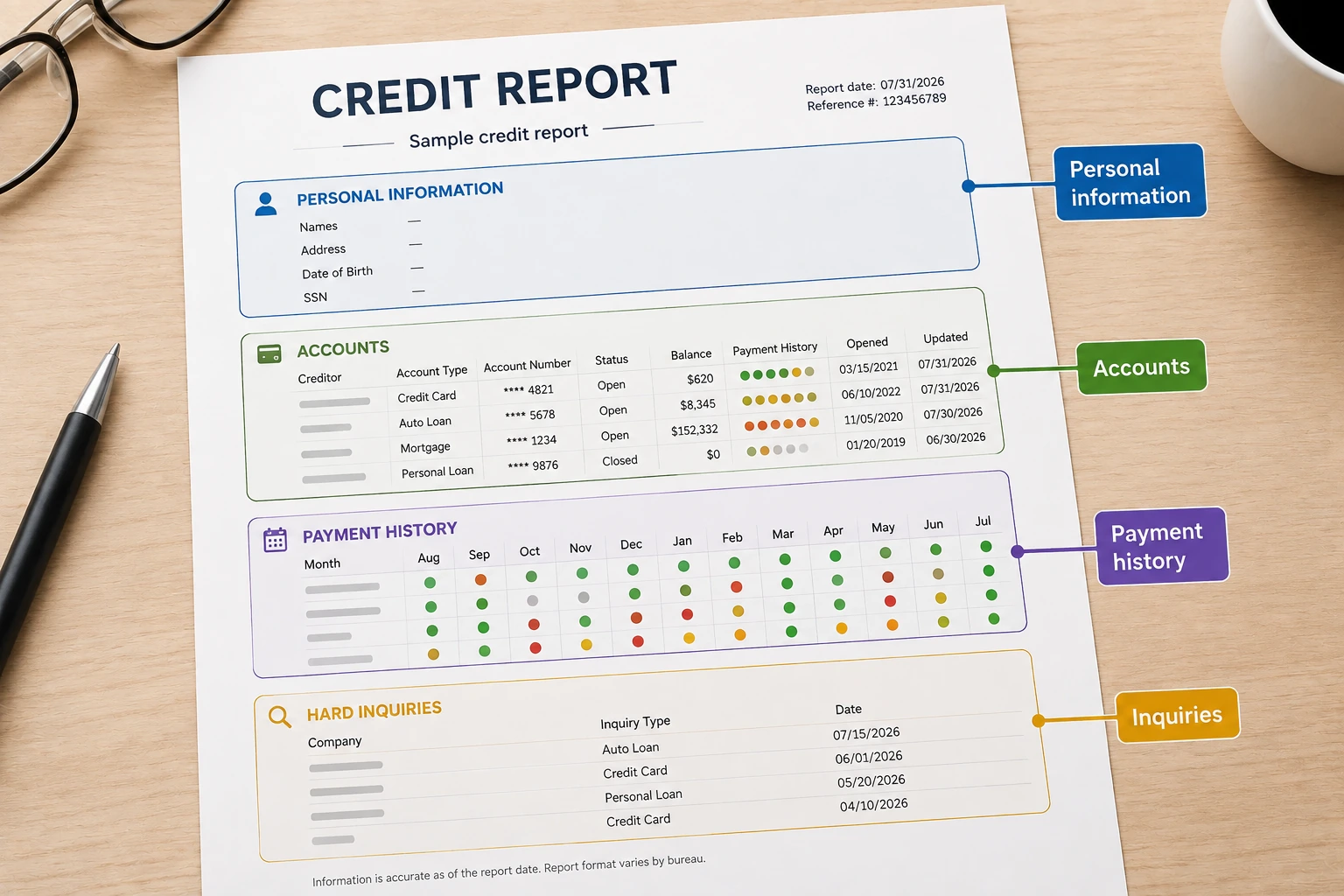
In this guide
- Before you begin: get the full credit reports
- Annotated sample credit report: what each field means
- Step 1: check your personal information
- Step 2: make sure every account belongs to you
- Step 3: check each account status
- Step 4: review your payment history
- Step 5: check balances, credit limits, and credit utilization
- Step 6: review collection accounts
- Step 7: review charge-offs
- Step 8: review hard inquiries
- Step 9: look for duplicate, incorrect, incomplete, or outdated information
- Step 10: make a credit report action list
- Credit report codes and status terms explained
- Credit report review checklist
- Frequently asked questions about reading a credit report
- Related identity and access issues
- Explore credit report problems
- Sources
To read your credit report, check your personal information, credit accounts, collections, public records, and inquiries. For each account, compare the status, payment history, balance, credit limit, and reporting date with your own records. Flag specific inaccuracies; a negative entry or an older balance is not automatically an error.
This guide includes a fictional account example, explanations of common codes, and a review checklist. Use the shortcuts below to find the part of your report you are looking at.
Before you begin: get the full credit reports
Open the account-level report, not just a score dashboard. A credit report and a credit score are different: the report gives you the entries you need to inspect. You can request free weekly reports from Equifax, Experian, and TransUnion at AnnualCreditReport.com, as confirmed by the FTC’s free-report guidance.
Save each report with the bureau name and download date. Keep recent statements and payment confirmations beside it, and use the same review process for all three reports. If you need help getting a copy, follow our free credit report request steps. Keep reports and completed worksheets private.
If you are reviewing reports because a bank declined a checking account, first identify which file it used. Our checking-account denial guide explains how to request a specialty report such as ChexSystems or Early Warning Services.
Annotated sample credit report: what each field means
Use this fictional example to see how the main fields on a credit report work together. The exact labels and layout can vary by credit bureau, but reports commonly include the creditor name, account type, balance, credit limit or original loan amount, payment history, account dates, and account status. CFPB
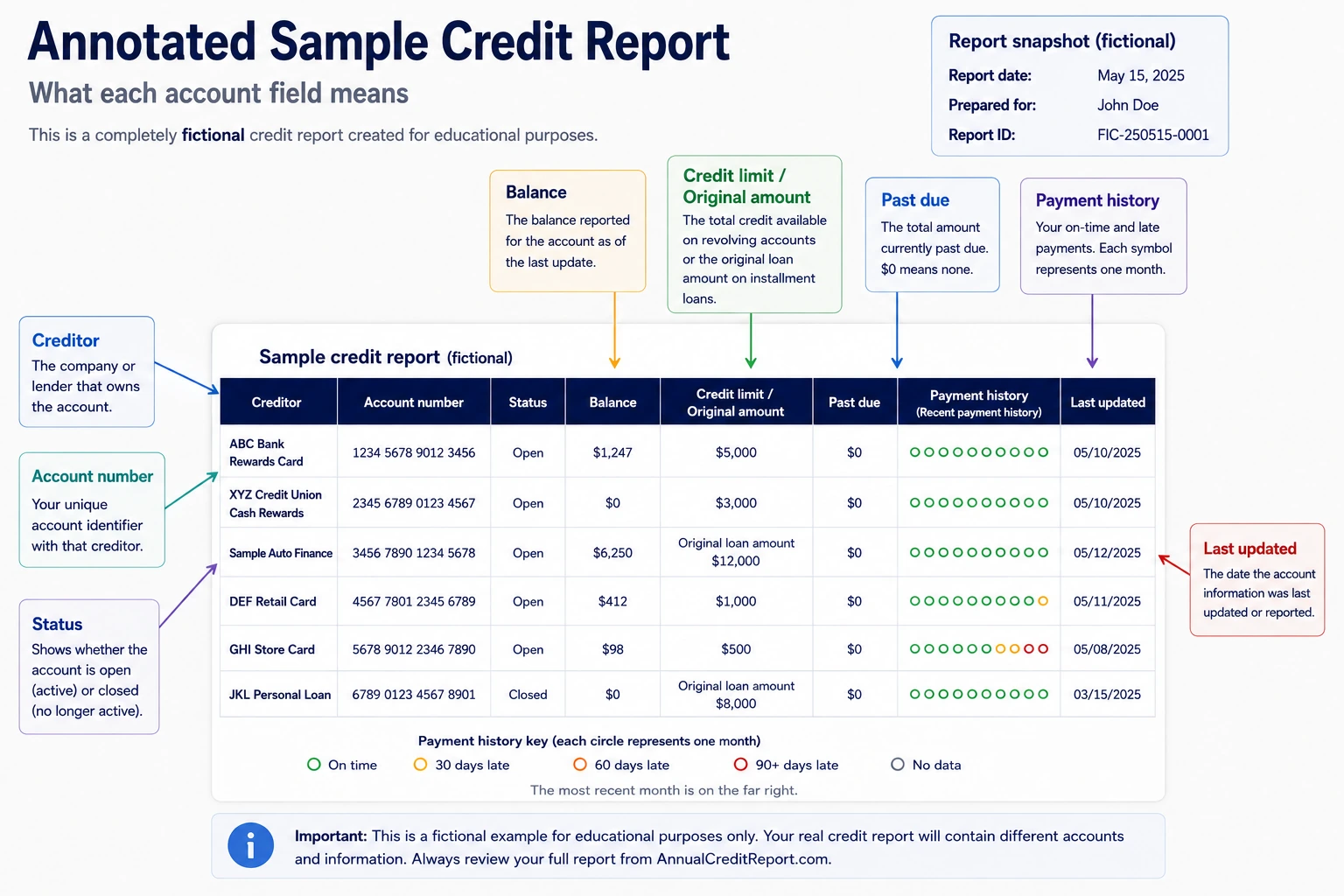
Fictional credit card account
| Credit report field | Example | What to check |
|---|---|---|
| Creditor | ABC Bank | Make sure you can connect the lender or issuing bank to an account you recognize. |
| Account number | ****4821 | Compare the available digits with your statement or online account records. |
| Account type | Revolving | Confirm that the account type matches the credit product. |
| Responsibility | Individual | Check whether your relationship to the account is reported correctly. |
| Account status | Open / Current | Confirm that the account is still open and currently not past due. |
| Date opened | 03/15/2021 | Compare the date with when you opened the account. |
| Reported balance | $620 | Compare the balance with your records for the period when the creditor last updated the account. |
| Credit limit | $1,000 | Compare the reported limit with the limit shown by your lender. |
| Past-due amount | $0 | Check whether the amount currently reported as past due matches your records. |
| Last updated | 07/31/2026 | Use this date when comparing the report with a recent payment, purchase, payoff, or limit change. |
| Payment history | May: OK | June: 30 | July: OK | Read each month separately. In this example, June was reported as 30 days past due even though the account was current again in July. |
How to interpret the example
Suppose you paid the $620 balance in full on August 3, but the report still shows $620 and says the account was last updated on July 31. That difference alone does not show that the report is wrong because the payment happened after the date shown on the report.
Now look at the June payment-history entry showing 30. If lender records show the account actually became at least 30 days past due, the entry may be accurate even though the account later returned to current status. If your records show the required payment was credited before the account reached 30 days past due, mark that specific entry for further verification.
| What you notice | How to classify it | What to check next |
|---|---|---|
| The report shows $620, but your account now shows $0 | Needs a reporting-date check | Compare the payment date with the account’s last updated date. |
| The account is current now but shows an earlier 30-day late payment | Not automatically inconsistent | Check whether the earlier delinquency actually occurred. |
| June shows 30 days late, but lender records show otherwise | Possible reporting error | Compare the due date, payment date, lender payment history, and payment confirmation. |
| ABC Bank is unfamiliar, but the other details match your card | Needs account verification | Check whether ABC Bank is the lender behind the credit product you recognize. |
| The account details do not match any of your records | Warning sign | Mark the account for further investigation. |
Step 1: check your personal information
Start by checking the personal information on your credit report. Depending on the report, this may include your name, current and previous addresses, date of birth information, phone numbers, and sometimes employer information.
Look for information that clearly does not belong to you, such as an address where you have never lived, a phone number you do not recognize, or identifying details that appear to belong to another person. The CFPB lists incorrect names, addresses, phone numbers, and mixed credit files among common credit report errors. CFPB
An old address or a previous version of your name is not automatically a problem. Personal identifying information such as your name and address does not directly affect your credit score, but unfamiliar information can be a reason to check the rest of the report more carefully. Experian
Example: If your report lists an apartment where you lived three years ago, that alone may not require action. But if it shows an address you have never used and you also see a credit card account you do not recognize, mark both for review and check the account details carefully.
If your personal information looks correct, move to the account section and make sure every credit account listed on the report actually belongs to you.
For an inaccurate name, address, or birth date, use the personal-information correction checklist. A report that incorrectly identifies you as deceased needs a separate process: trace and correct a mistaken deceased indicator.
Step 2: make sure every account belongs to you
Check every credit account on your report and make sure you can connect it to a credit card, loan, lender, or other account you actually opened or used. For each entry, compare the creditor name, account type, partial account number, date opened, reported balance, and account status with your own records.
Do not assume an unfamiliar creditor name automatically means the account is fraudulent. A retail credit card, for example, may appear under the name of the bank that issued the card rather than the store where you applied. Compare all available account details with your statements or online account records first.
| What to check | What you are looking for |
|---|---|
| Creditor name | A lender, issuing bank, servicer, or company connected to an account you recognize. |
| Account type | A credit card, auto loan, mortgage, personal loan, student loan, or other credit account you opened. |
| Partial account number | Digits that match your statements or online account records. |
| Date opened | A date that makes sense based on when you opened or obtained the account. |
| Reported balance | An amount that makes sense when compared with your records and the date the account was last updated. |
| Account status | Whether the account is reported as open, closed, current, late, charged off, transferred, or under another status. |
Example: Suppose you have a store credit card, but the store name does not appear on your credit report. Instead, you see the name of a bank you do not immediately recognize. Compare the partial account number, opening date, account type, and reported balance with your store-card records before deciding the account is not yours.
If an account still does not match anything in your records, mark it for further review. The CFPB identifies accounts belonging to another person, accounts resulting from identity theft, and the same debt listed more than once as problems consumers should look for when reviewing their credit reports. CFPB
If what looks like the same account appears twice, compare the creditor names, partial account numbers, balances, dates, and statuses before assuming both entries are wrong. If you need help comparing the entries, see how to identify a duplicate account on your credit report.
Check your responsibility, too. An account can belong on your report while your role is wrong. The CFPB lists being shown as an account owner when you are only an authorized user as a reporting error. Compare the responsibility field with your account agreement or issuer’s records. CFPB: common reporting errors.
Once you confirm that an account belongs to you, check whether the account status itself is being reported correctly.
If an account you know you opened is absent altogether, use our missing-account self-check to compare all three bureau reports and find out whether the lender actually reports the account.
Step 3: check each account status
If a student loan shows default, distinguish the default status from earlier late-payment history. Our student loan default reporting guide explains which records may change after rehabilitation or consolidation.
Check whether each account’s reported status matches your records. Read the status together with the balance, payment history, and date last updated rather than relying on one word or code by itself.
Credit reports may use different wording or codes depending on the bureau and the version of the report. Common descriptions include open, current, closed, paid, past due, transferred, charged off, and collection. Experian
| Status you may see | What it generally tells you | What to check |
|---|---|---|
| Open / Current | The account is reported as open and currently not past due. | Confirm that the account is still open and that recent payment history supports the current status. |
| Closed | The account is no longer open for new activity. | Check whether the account was actually closed, whether a balance remains, and whether the payment history is accurate. |
| Paid / Paid in Full | The account is reported as having no remaining balance due. | Confirm that the reported balance is $0 and review historical payment information separately. |
| Past Due / Delinquent | The account is reported as behind on payments. | Compare the reported month and delinquency level with lender records and payment confirmations. |
| Transferred | The account was transferred to another lender, servicer, or company. | Check for a corresponding entry and compare balances, dates, and statuses. |
| Charged Off | The creditor reported the account as a charge-off. | Check the balance, dates, payment history, and whether the account was later transferred or sold. |
| Collection | The account or debt is reported in collection. | Check the collection company, original creditor if shown, balance, status, and whether you recognize the debt. |
Example: Suppose a credit card you still use appears as Closed. Compare the partial account number, date last updated, balance, and status with your online account or most recent lender statement. If the lender still shows the card as open, mark the reported status for further review. If the card really was closed but still has a legitimate outstanding balance, “Closed” by itself does not mean the balance should be $0.
The CFPB specifically recommends checking for account-status errors such as closed accounts reported as open, accounts incorrectly reported as late or delinquent, and incorrect account dates. CFPB
Step 4: review your payment history
Review the payment history for each account month by month and look for periods reported as 30, 60, 90, or 120+ days late. If you find a late-payment mark, compare the reported month and delinquency level with your lender account history, bank records, and payment confirmations.
The way payment history appears can vary by report. For example, TransUnion may show an on-time payment as “OK” and reported delinquencies as “30,” “60,” “90,” or “120.” TransUnion
| What you see | What it generally means | What to check |
|---|---|---|
| Current / OK | The account was reported as current for that period. | Compare the entry with your lender’s payment history if you are checking a specific month. |
| 30 days late | The creditor reported the account as 30 days past due. | Check the due date, when the lender credited the payment, and the month shown on the report. |
| 60 days late | The account was reported as 60 days past due. | Check whether the delinquency continued long enough to reach that level. |
| 90 days late | The account was reported as 90 days past due. | Compare the sequence of reported late months with lender records. |
| 120+ days late | The account was reported as seriously delinquent. | Check the later account status, including whether it was subsequently charged off or sent to collection. |
Example: Suppose your report shows March as current, April as current, May as 30 days late, and June as current. Check the May payment due date against your lender’s transaction history and payment confirmation. If your records show the payment was credited before the account reached 30 days past due, mark the May entry for further review.
A payment can be late under your account agreement without appearing as a 30-day late payment on your credit report. Creditors generally do not report a delinquency to the credit bureaus until an account is at least 30 days past due, although lender consequences such as a late fee may occur earlier. Experian
Do not treat a late-payment mark as an error simply because it is negative. First determine whether the reported month and delinquency level match your records.
Step 5: check balances, credit limits, and credit utilization
Check the reported balance and credit limit for each revolving account, such as a credit card or line of credit. Compare those numbers with your account records and the date the account was last updated.
A reported balance may differ from the balance you see in your account today because lenders provide account information on their own reporting schedules. Before treating a balance difference as an error, compare the payment or transaction date with the report’s last updated date. Experian
The CFPB lists incorrect current balances and incorrect credit limits among common credit report errors consumers should check for. CFPB
| What to check | What to compare | What the result may mean |
|---|---|---|
| Reported balance | Recent statements, payments, and the account’s last updated date. | A difference may reflect an earlier reporting date. A balance that conflicts with creditor records for the same reporting period needs further review. |
| Credit limit | The limit shown in your lender account or statement. | An incorrect limit can also affect the utilization rate calculated from your credit report. |
| Last updated date | The date of recent payments, purchases, or limit changes. | A report updated before the change may simply contain older information. |
| Installment-loan balance | Your lender records and original loan amount. | Installment loans are not calculated the same way as revolving credit utilization. |
Calculate the utilization on each revolving account
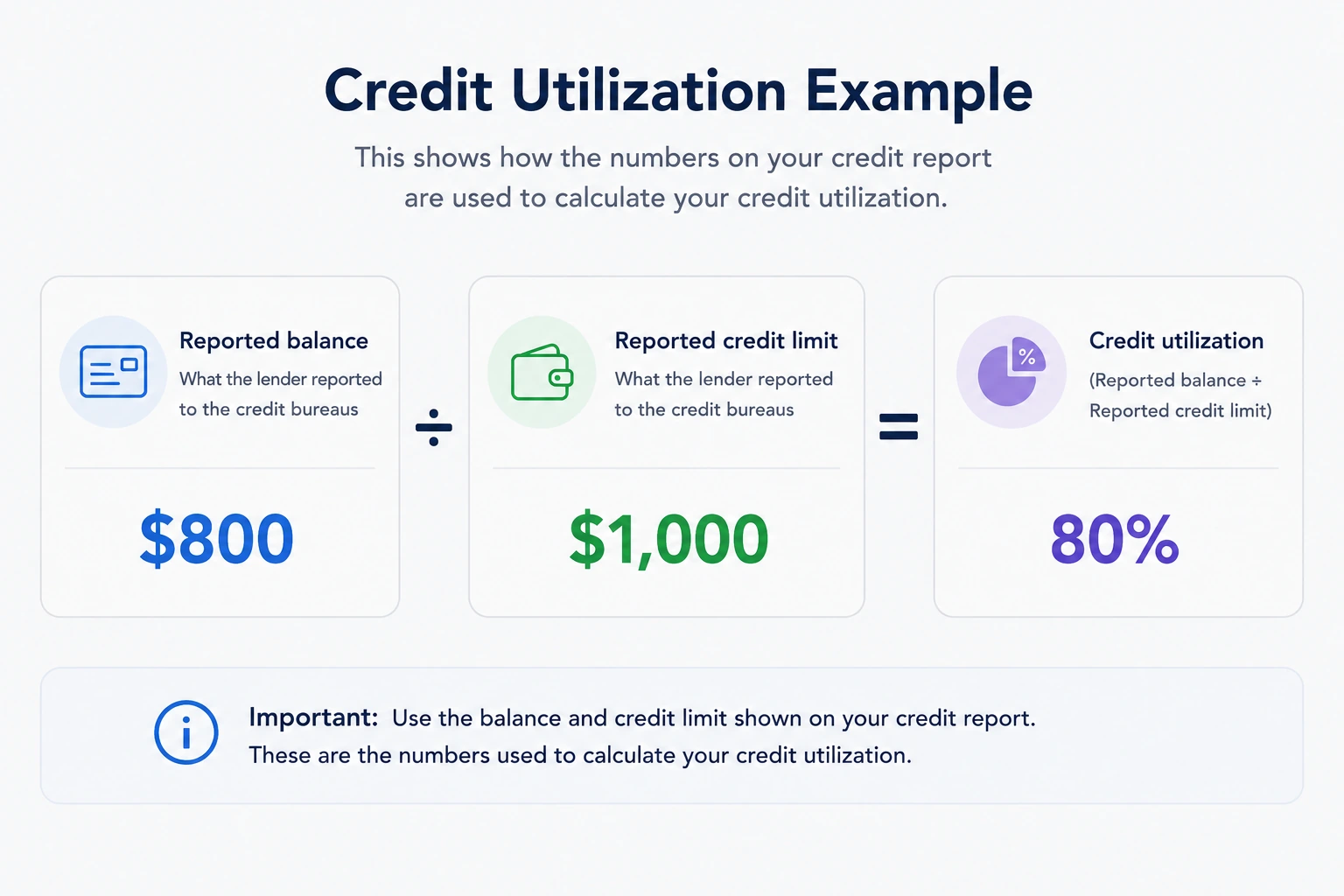
For a revolving account with a reported credit limit, calculate credit utilization by dividing the reported balance by the credit limit and multiplying by 100:
Reported balance ÷ credit limit × 100 = credit utilization
Example: If a credit card shows an $800 reported balance and a $1,000 credit limit:
$800 ÷ $1,000 × 100 = 80% utilization
FICO considers revolving credit utilization when calculating FICO Scores. The calculation can consider utilization on individual revolving accounts and across revolving accounts, but there is no single utilization percentage that guarantees a specific score result. FICO
If the reported balances and limits are accurate but your revolving utilization is high, the issue may be how much of your available credit is being used rather than a reporting error. See how credit utilization works.
Step 6: review collection accounts
Review each collection account separately and confirm that the debt belongs to you, the collection agency and original creditor make sense, and the reported balance, status, and dates match your records.
| What to check | What you are looking for | What to do if something looks wrong |
|---|---|---|
| Collection agency | A company connected to a debt you recognize. | Confirm who the agency is collecting for before taking action. |
| Original creditor | A company connected to the original debt, if shown. | Compare the name with old bills, statements, or collection notices. |
| Reported balance | An amount that makes sense based on your records. | Compare it with recent notices, payment records, and the last updated date. |
| Payment status | Whether the collection is reported as unpaid, paid, settled, or under another status. | If you recently paid it, compare the payment date with the report’s update date. |
| Dates | Dates consistent with the history of the debt. | Mark inconsistent or unfamiliar dates for further review. |
| Possible duplicate | Whether two entries appear to represent the same debt. | Compare the original creditor, partial account numbers, balances, dates, and collector names. |
Example: Suppose your report shows a $740 collection from ABC Collections for an old cable account. Confirm that the original creditor is a provider you used, then compare the balance, dates, and account details with bills, collection notices, or payment records. If another collection entry appears to involve the same debt, compare both before assuming one is a duplicate.
The CFPB identifies accounts that do not belong to you, incorrect balances, incorrect account statuses, and the same debt listed more than once as problems consumers should look for. CFPB
Do not dispute a collection simply because it is negative. First determine whether the information itself is inaccurate, incomplete, duplicated, outdated, or does not belong to you.
If the collection has already been paid and still appears on the report, see removing a paid collection from your credit report to identify the correct next step.
Step 7: review charge-offs
If an account is reported as charged off, verify the creditor, account status, balance, payment history, and dates. A charge-off means the creditor wrote the seriously delinquent account off as a loss; it does not mean the debt automatically disappeared or was forgiven.
Depending on the report, a charge-off may appear in the account status, comments, or payment-history codes. Experian, for example, uses “CO” as a payment-history code for charge-off. Experian
| What to check | What you are looking for | What to do if it does not match |
|---|---|---|
| Creditor name | An original creditor connected to an account you recognize. | Compare the name, partial account number, and account type with old records. |
| Account status | A status consistent with the account history. | Compare it with the payment history and creditor records. |
| Reported balance | An amount that makes sense based on what was owed and whether the debt was later sold or transferred. | Compare it with creditor statements, payment records, and collection notices. |
| Past-due amount | The amount reported as delinquent, if shown. | Compare it with the account history for the same period. |
| Payment history | A history consistent with the delinquency that led to the charge-off. | Compare reported late-payment months with lender records. |
| Sold or transferred account | An indication that another company may now own or collect the debt. | Check whether a separate collection account appears and compare balances and statuses. |
Example: Suppose an original credit card account shows a $1,900 charge-off and you also see a separate collection account connected to the same debt. Do not assume the two entries automatically mean the debt is duplicated. Compare the original creditor, collector, partial account numbers, balances, statuses, and dates.
If a charged-off debt was sold, the original charged-off account may update to a $0 balance while a separate collection account reports the amount owed. Experian
If a paid account still reports money owed, use our paid charge-off balance checklist to compare the reporting date and settlement records.
If a mortgage account is marked foreclosure, check how long foreclosure stays on your credit report. The guide explains which missed-payment date matters and how to separate it from the foreclosure completion and latest reporting dates.
For a deeper explanation of these entries, see what a charge-off on your credit report means.
Do not dispute a charge-off simply because it is negative. First determine whether the creditor, balance, payment history, status, or dates are inaccurate or inconsistent with your records.
Step 8: review hard inquiries
Check the inquiry section and make sure you can connect each hard inquiry to a credit application or other credit-related request you recognize. Compare the company name and inquiry date with your application records before deciding that an inquiry is unauthorized.
Hard inquiries often occur when a lender checks your credit after you apply for credit and can affect your credit score. Soft inquiries can include checking your own credit report, account reviews, and prescreening, and they do not affect your credit score. CFPB
| What you see | What to check | What to do next |
|---|---|---|
| Hard inquiry you recognize | Compare the company and date with an application you made. | If it matches, continue reviewing the report. |
| Hard inquiry from an unfamiliar company | Check application paperwork and lender records because the bank name may differ from the brand you remember. | Verify the company before assuming the inquiry is unauthorized. |
| Hard inquiry you cannot connect to an application | Confirm that you did not apply for credit or request another transaction involving a credit check around that date. | Mark it for further review and contact the company that made the inquiry. |
| Soft inquiry | Check who accessed your report and, if shown, the reason. | Do not treat it as a score problem simply because it appears on your copy of the report. |
Example: Suppose your report shows a hard inquiry from ABC Bank dated April 12. You do not recognize the bank name, but you applied for auto financing at a dealership on April 11. Check your financing documents before treating the inquiry as unauthorized.
An unfamiliar company name does not automatically mean an inquiry is fraudulent. Store credit or other financing may appear under the name of the bank behind the product. If you still cannot explain a hard inquiry after checking your records, contact the company that placed it. TransUnion
For more examples, see our soft vs. hard credit inquiry guide.
Step 9: look for duplicate, incorrect, incomplete, or outdated information
Check public records and bankruptcy
Do not skip the public-record section. Experian identifies bankruptcy as the public record that appears on its credit reports. Check that any case belongs to you, then compare the chapter, filing date, court, and case status with your court records.
For a detailed timeline, see how long bankruptcy stays on your credit report. The guide separates Chapter 7 and Chapter 13 removal schedules from discharge dates and the histories of individual accounts.
Experian states that Chapter 7 bankruptcy records are removed 10 years after filing and Chapter 13 records seven years after filing. Read the filing date separately from the discharge date or a creditor’s latest update. A newly updated account is not necessarily a newly filed bankruptcy. See Experian’s public-record explanation.
Example: If the case is yours but the filing date is wrong, record that exact discrepancy and retain the relevant court document. If the case is not yours, flag the identity mismatch. An empty public-record section does not tell you whether the separate account or collection sections contain problems.
Compare possible errors with your records
After reviewing each section, scan the entire report again for information that does not match your records. Focus on specific discrepancies rather than treating every negative item as an error.
The CFPB recommends checking for identity errors, accounts belonging to someone else, incorrect account statuses, inaccurate late-payment reporting, incorrect dates, duplicate debts, wrong balances, and incorrect credit limits. CFPB
| What you found | Is it automatically an error? | What to verify |
|---|---|---|
| Account you do not recognize | No | Compare the creditor, partial account number, account type, date opened, balance, and related inquiries. |
| Wrong-looking balance | Not necessarily | Compare the balance with creditor records for the account’s last updated date. |
| Late payment you believe is wrong | Possibly | Check the due date, lender payment history, bank records, and payment confirmation. |
| Same debt appears more than once | Not always | Compare creditor names, collectors, account numbers, balances, ownership, statuses, and dates. |
| Closed account still has a balance | Not automatically | Confirm whether the account was closed while a legitimate balance remained. |
| Paid account still appears unpaid | Possibly | Compare the payment date with the account’s last updated date and current creditor records. |
| Incorrect credit limit | Possibly | Compare the reported limit with current lender records. |
| Unfamiliar hard inquiry | Not automatically | Check application records and verify the company. |
| Negative information that matches your records | No | Do not classify accurate information as an error simply because it is negative. |
Example: Suppose a card shows a $2,400 balance and a 30-day late payment for May. Your lender records show a $1,200 balance for the relevant reporting period, and your payment history indicates the required payment was credited before the account became 30 days past due. Identify the specific fields that appear inconsistent—the balance and May payment status—and save records supporting each discrepancy.
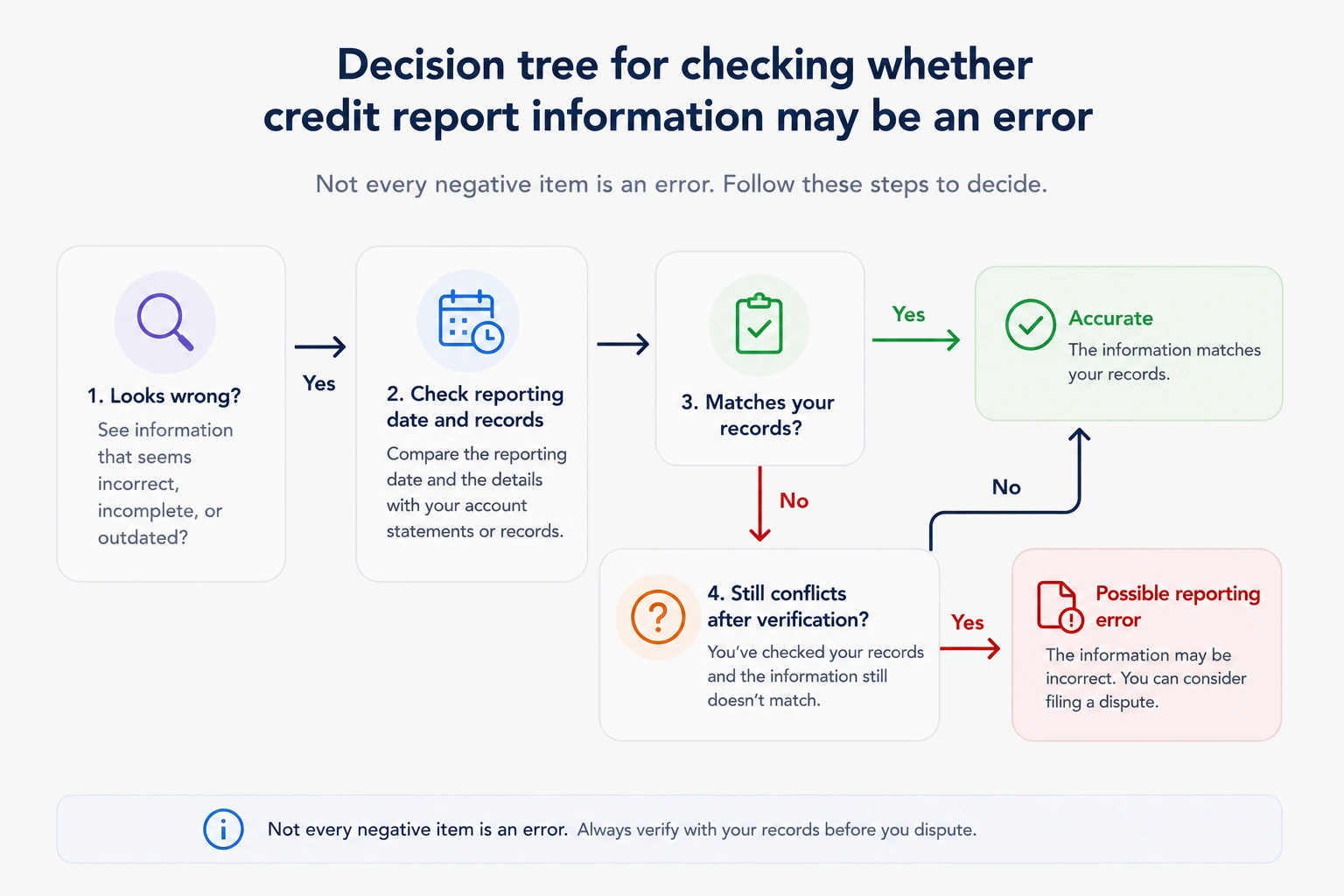
If information still appears inaccurate or incomplete after you verify the details, the next step may be a formal dispute. The CFPB recommends identifying what information is wrong, explaining why it is wrong, and providing supporting documents when available. CFPB
For the full process, see how to dispute errors on your credit report.
Step 10: make a credit report action list
Turn everything you found into a short action list before contacting a creditor or credit bureau. Classify each item as accurate, needs verification, a possible reporting error, an accurate issue that needs financial action, or a recent change that may not be reflected yet.
| What you found | Category | What to do next |
|---|---|---|
| The information matches your records | Accurate | No correction is needed. |
| Something looks wrong, but you cannot confirm it | Needs verification | Compare the entry with statements, lender records, payment confirmations, or other records from the relevant period. |
| The reported information still conflicts with your records | Possible reporting error | Write down exactly what appears wrong and save records that support your position. |
| The information is negative but accurate | Needs financial action | Address the underlying issue instead of disputing accurate information. |
| A recent payment, payoff, or account change is not reflected | May need an update | Compare the date of the change with the account’s last reported date before treating it as an error. |
Example: Suppose an auto loan you recently paid off still shows a $4,300 balance, a 30-day late payment on another account conflicts with your lender records, and a credit card accurately shows an $820 balance on a $1,000 limit. The auto-loan balance may simply reflect an older reporting date, the late-payment entry needs evidence and further verification, and the high card balance is an accurate utilization issue rather than a reporting error.
If your score also fell after the payoff, use our payoff-specific credit-score drop diagnostic to separate a reporting delay from other credit-profile changes.
If an item still appears inaccurate or incomplete after you verify it, collect evidence that addresses the specific problem. The CFPB recommends identifying each error, explaining why the information is wrong, and including copies of supporting documents when available. CFPB Before submitting a dispute, see which documents can support a credit report dispute.
Do not dispute information simply because it is negative. Accurate negative information generally cannot be removed merely because it is unfavorable. CFPB
If the information is accurate but reveals legitimate credit problems, use those findings to improve your credit score step by step.
Credit report codes and status terms explained
Do not interpret a credit report code by itself. Read it together with the account status, payment history, balance, and reporting date. Exact abbreviations can vary by credit bureau and report format, so use the legend or rating key provided with your specific report.
| Code or term you may see | What it generally means | What to check |
|---|---|---|
| OK / Current | The payment or account was reported as current for that period. | Compare the entry with lender records if you are checking a specific month. |
| 30 | The account was reported as 30 days past due. | Check the due date, credited payment date, and reported month. |
| 60 | The account was reported as 60 days past due. | Verify whether the delinquency continued long enough to reach that level. |
| 90 | The account was reported as 90 days past due. | Compare the sequence of late months with lender records. |
| 120 / 120+ | The account was reported as seriously delinquent. | Check the later account status. |
| CO / C/O | May indicate a charge-off, depending on the report. | Confirm the abbreviation using the report’s legend and review the account details. |
| C / Col | May indicate collection, depending on the report. | Confirm the code using the report’s own key. |
| ND / No data | No payment information was reported for that period. | Do not interpret missing information as either an on-time or late payment. |
Example: If payment history shows May as “OK,” June as “30,” and July as “OK,” those entries are not necessarily contradictory. They can mean the account was reported 30 days past due in June and returned to current status in July.
TransUnion and Experian provide their own explanations of payment-history codes and account-status information. Always confirm an unfamiliar abbreviation using the key supplied with the report you are reading. TransUnion Experian
Credit report review checklist
For a separate printable worksheet that helps you track errors across all three bureaus, use our seven-step credit report cleanup checklist. Keep completed copies and supporting documents private.
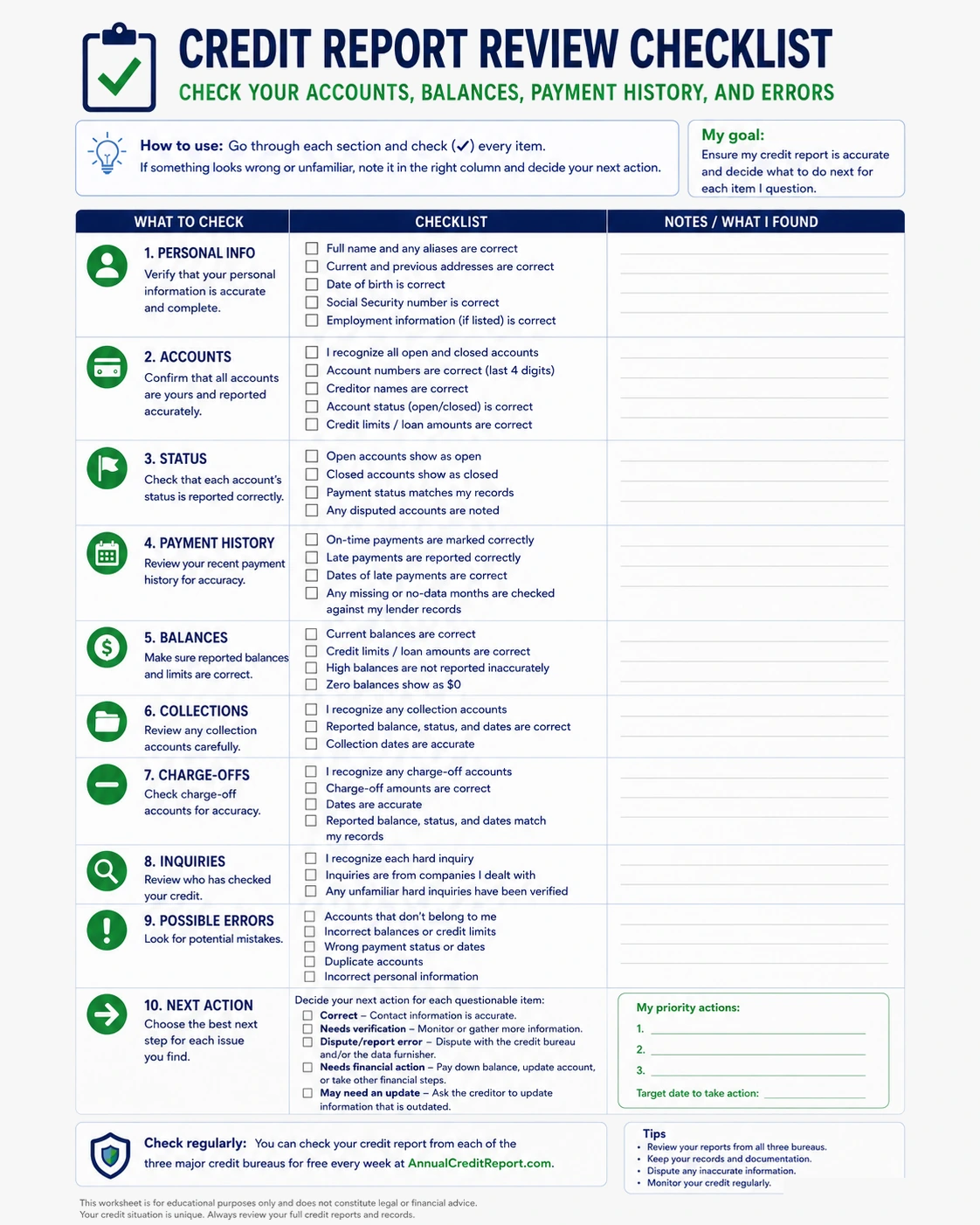
Use this checklist after you have read your credit report from beginning to end. For anything questionable, compare the entry with your own records before deciding that the information is incorrect.
- ☐ Personal information: Confirm that identifying information belongs to you.
- ☐ Accounts: Make sure you recognize every listed account.
- ☐ Account status: Check whether each status matches your records.
- ☐ Payment history: Verify reported late payments month by month.
- ☐ Reported balances: Compare balances with records for the relevant reporting date.
- ☐ Credit limits: Confirm revolving credit limits.
- ☐ Credit utilization: Compare revolving balances with reported limits.
- ☐ Collections: Verify the collector, original creditor, balance, status, and dates.
- ☐ Charge-offs: Check the creditor, balance, status, payment history, and whether the debt was sold or transferred. If ownership is unclear, compare a charged-off account vs. sold account.
- ☐ Hard inquiries: Connect each hard inquiry to an application or other credit request you recognize.
- ☐ Public records: Verify any bankruptcy case, chapter, filing date, and status against court records.
- ☐ Possible duplicates: Compare account numbers, creditor or collector names, balances, statuses, and dates.
- ☐ Account dates: Check opening dates, payment-history dates, and other important dates.
- ☐ Recent changes: Compare recent payments or account changes with the last updated date.
- ☐ Possible reporting errors: Identify the exact field that appears wrong and the evidence that supports your position.
- ☐ Accurate negative information: Separate unfavorable but accurate information from actual reporting problems.
- ☐ Next action: Classify every questionable item as correct, needs verification, possible error, needs financial action, or may need another update.
| If your review shows… | What to do next |
|---|---|
| Everything matches your records | No correction is needed. |
| You cannot tell whether an item is correct | Verify it using statements, lender records, payment confirmations, or other relevant documents. |
| Information still conflicts with your records | Identify the specific discrepancy and save supporting evidence. |
| Negative information appears accurate | Address the underlying financial issue rather than treating it as a reporting error. |
| A recent change is missing | Check the last updated date before deciding that a correction is necessary. |
Frequently asked questions about reading a credit report
What is the easiest way to read a credit report?
Read it section by section. Start with personal information, then verify accounts, statuses, payment history, balances and credit limits, collections and charge-offs, and hard inquiries. Finish by comparing questionable information with your own records.
Why is the balance on my credit report different from the balance in my account?
Your credit report may contain information the lender reported before your most recent payment or purchase. Compare the account’s last updated date with the transaction date before deciding that the balance is inaccurate. TransUnion
Do Equifax, Experian, and TransUnion reports always contain the same information?
No. Lenders may report to one, two, or all three nationwide credit reporting companies, and updates may be provided at different times. Reports can also use different layouts and labels, so compare the underlying account information rather than expecting all three reports to look identical. TransUnion
Does checking my own credit report hurt my credit score?
No. Checking your own credit report does not hurt your credit score. The CFPB explains that requesting your own report does not affect your credit scores. CFPB
What does “no late payments” mean on a credit report?
If a report or monitoring app indicates that there are no late payments, it generally means it is not currently identifying reported delinquencies in the payment-history information it is showing you. Do not interpret a simplified app label as a guarantee that every bureau contains identical data. Check the actual account payment-history grids and statuses on the underlying reports.
What should I do if something on my credit report looks wrong?
Verify the specific information first. Compare the creditor, partial account number, balance, status, dates, and payment history with records from the same period.
If the information still appears inaccurate or incomplete, identify exactly what is wrong and save supporting records. The CFPB recommends explaining what information you believe is incorrect, why it is incorrect, and including supporting documents when available. CFPB
Do not treat accurate negative information as a reporting error simply because it is unfavorable.
If you confirm an error: dispute the specific entry with each bureau showing it and with the company that supplied it. Include copies of relevant supporting documents and keep a record of what you send. If you suspect identity theft, use IdentityTheft.gov for recovery steps. See the CFPB’s dispute instructions and our step-by-step credit report dispute guide.
Related identity and access issues
Use the Credit Score Guides hub to choose your next step, or start with a specific issue below.
- Mixed credit file — what to do when another consumer’s information appears on your report.
- Why can’t my credit report be retrieved? — troubleshoot identity-verification and file-access problems.
- Responsibility terminated — understand a change in your reported role on an account.
Explore related guides on credit reports and disputes.
Explore credit report problems
These focused guides can help you choose the next step for your situation:
Sources
- Federal Trade Commission — Free credit reports
- Consumer Financial Protection Bureau — What is a credit report?
- Consumer Financial Protection Bureau — Common credit report errors
- Consumer Financial Protection Bureau — What is a credit inquiry?
- Consumer Financial Protection Bureau — How to dispute an error on your credit report
- Experian — Understanding your Experian credit report
- TransUnion — Credit reporting agencies and credit report information
- FICO — Understanding accounts that may affect your credit utilization ratio
This article is for educational purposes only and is not financial, legal, or credit-repair advice. Credit report formats and reporting details can vary by credit bureau and information furnisher. Credit score effects can also vary based on the scoring model and the rest of an individual’s credit file.