Quick answer: what to do if your credit report is wrong
If your credit report is wrong, start by identifying the exact information that is inaccurate or incomplete, gathering records that show what the information should say instead, and disputing the error with each credit bureau that reports it. You may also need to dispute the information with the lender, creditor, collection agency, or other company that furnished the data. This is the basic process for how to dispute errors on your credit report and get incorrect information investigated.
When disputing errors on your credit report, be specific. A mistake on your credit report might be an account that does not belong to you, a payment incorrectly reported as late, a wrong balance, an inaccurate account status, or duplicate information. Negative information that is accurate is different from a reporting error and generally should not be disputed simply because it hurts your credit.
If you are trying to fix errors on your credit report, document both sides of the problem: what the credit report currently shows and what your records show is correct. That simple comparison makes fixing mistakes on your credit report more organized and helps you prepare a clear dispute supported by relevant evidence.
Start here: 4 things to do before you file a dispute
- Find the exact error.
Identify the account, payment, balance, status, date, or other information that appears incorrect. - Write down what should be reported instead.
Compare the information on your credit report with account statements, payment records, creditor communications, or other relevant documents. - Gather evidence.
Collect copies of records that directly support why the reported information may be wrong. - Identify who needs the dispute.
Determine which credit bureau is reporting the error and whether you should also dispute the information with the company that furnished it.
Next: Use the 60-second decision tree below to decide whether you found a genuine credit report error and what your next step should be.
Credit Report Is Wrong? Use This 60-Second Decision Tree
If your credit report is wrong or you have found a possible credit report error, do not file a dispute automatically. First determine whether the information is actually inaccurate or incomplete, whether it belongs to you, and whether you can identify what should be reported instead. This quick decision tree shows you what to do if your credit report is wrong and whether disputing the information is the right next step.
1. Does the account or information belong to you?
NO → An account you do not recognize or someone else’s information on your report may be more than a simple mistake on your credit report. It could involve identity theft or a mixed credit file. Save a copy of the report, identify exactly what does not belong to you, and investigate the source of the information before choosing the appropriate dispute or identity-theft process.
YES → Continue to Question 2.
2. Is the reported information actually inaccurate or incomplete?
NO → Negative information is not automatically a reporting error. If a late payment really occurred, a balance is accurate, or an account status is correctly reported, an accuracy dispute generally is not the right way to address it simply because the information hurts your credit.
YES → You may have a valid credit report error. Continue to Question 3.
3. Can you identify exactly what should be reported instead?
YES → Write down both versions: what your credit report currently shows and what your records show is correct. This comparison is one of the most useful steps when disputing errors on your credit report because it makes the problem specific and easier to document.
NOT YET → Review account statements, payment confirmations, creditor communications, payoff records, or other relevant documents until you can identify what the correct information should be.
4. Do you have records that support your position?
YES → You are ready to prepare a specific, evidence-based dispute. Identify every credit bureau reporting the inaccurate information and determine whether you should also dispute it with the lender, creditor, collection agency, or other company that furnished the data.
NO → Gather relevant documentation before submitting the dispute. When fixing mistakes on credit report entries, your goal is to clearly identify what is wrong, explain what should be reported instead, and provide records that support your position when available.
Quick decision table: what can you dispute on your credit report?
| What you found | Potential credit report error? | Best next step |
|---|---|---|
| Account that does not belong to you | Yes — additional investigation may be needed | Document the unfamiliar account and check whether identity theft or a mixed credit file may be involved. |
| Payment reported late even though your records show it was paid on time | Yes | Gather payment records and prepare a dispute addressing the specific payment-history error. |
| Wrong account balance | Yes | Compare the reported balance with your statement or other account records and document the difference. |
| Incorrect account status | Yes | Gather records showing the correct status and dispute the inaccurate information. |
| Duplicate account or duplicated information | Possibly | Compare both entries and identify exactly what information is duplicated or inaccurate. |
| Incorrect personal information | Possibly | Identify the incorrect detail and gather appropriate records showing the correct information. |
| Late payment that actually occurred | Usually no | Do not use an accuracy dispute solely because accurate negative information hurts your credit. |
| High balance that is correctly reported | No | A correctly reported high balance is not a credit report accuracy error. |
If you searched for how to fix error on credit report, the practical answer is to start with the specific disputed entry rather than the credit report as a whole. Document what is currently reported, determine what should be reported instead, and collect records that support the correction.
Bottom line: A wrong credit report should be handled by identifying the exact inaccurate or incomplete information first. Once you know what is wrong and what the correct information should be, you can gather relevant evidence, identify the credit bureau and furnisher involved, and prepare a clear dispute. If the information is accurate, a credit report accuracy dispute is generally not the appropriate solution.
What Counts as a Credit Report Error?
A credit report error is information in your credit file that is inaccurate or incomplete. Common credit report errors include accounts that do not belong to you, payments incorrectly reported as late, inaccurate balances or credit limits, wrong account statuses, incorrect account dates, duplicate debts, and personal information that belongs to another consumer.
If you are asking what can I dispute on my credit report, focus on a specific fact that you believe is wrong. A mistake on credit report information is different from accurate negative information. A real late payment, a correctly reported high balance, or a valid debt does not become a reporting error simply because it hurts your credit.
The quickest way to evaluate incorrect information on credit report entries is to compare what the report says with your own account records. If you find wrong information on credit report data, identify the exact field, determine what it should say instead, and gather records that support the correction.
Credit Report Error or Not? Quick Check
| What appears on your credit report | Potential credit report error? | What to check first |
|---|---|---|
| Account you never opened | Yes — investigate immediately | Check account ownership and whether identity theft or a mixed-file problem may be involved. |
| Payment reported late even though your records show it was paid on time | Yes | Compare the reported month with payment confirmations, account history, and bank records. |
| Balance does not match your records | Possibly | Compare the balance with your statement and check the date the creditor reported the account information. |
| Credit limit is incorrect | Possibly | Check recent account statements or records from the card issuer showing the correct limit. |
| Open account reported as closed, or closed account reported as open | Yes | Review account status, closure records, and creditor communications. |
| You are listed as the owner of an account when you were only an authorized user | Yes | Check the account relationship shown by the lender and your credit report. |
| Same debt appears more than once | Possibly | Compare both entries, account numbers, balances, furnishers, and account dates to identify what is duplicated or inaccurate. |
| Someone else’s identifying or account information appears in your file | Yes — investigate further | Check whether your credit file may have been mixed with another consumer’s information. |
| Late payment that actually occurred | Usually no | If the payment history is accurate, it is not an accuracy error simply because it is negative. |
| High balance that is correctly reported | No | A correctly reported balance may affect your credit, but it is not a credit report reporting error. |
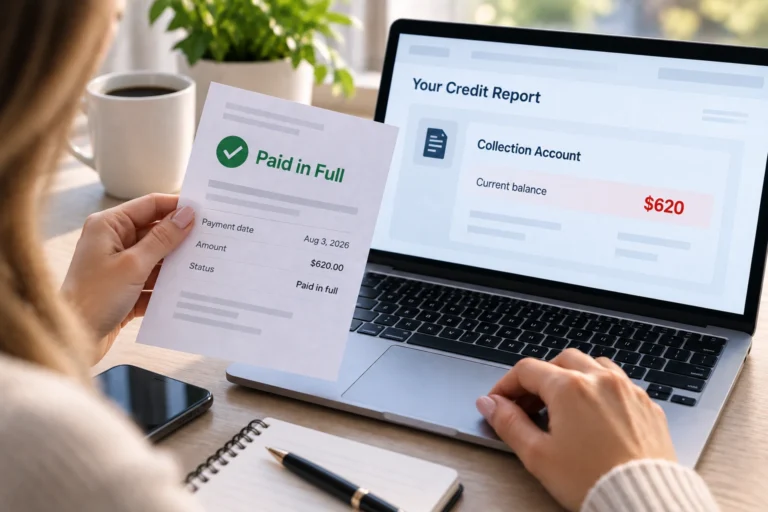
| Valid collection account with correctly reported information | Not simply because it is negative | Check ownership, balance, dates, and status. Dispute only the information you believe is inaccurate or incomplete. |
Account on Credit Report That Is Not Mine
An account on credit report that is not mine can be a serious error. The account may belong to another consumer with a similar name, may be connected to identity theft, or may indicate that information from two consumers has been combined in a mixed credit file.
If you do not recognize the account, save a copy of the report and record the creditor name, account information, balance, dates, and which credit bureau is reporting it. Do not assume that every unfamiliar name automatically means fraud, because creditors and collection accounts may sometimes appear under names you do not immediately recognize. Verify the source before deciding which correction process applies.
Incorrect Late Payment on Credit Report
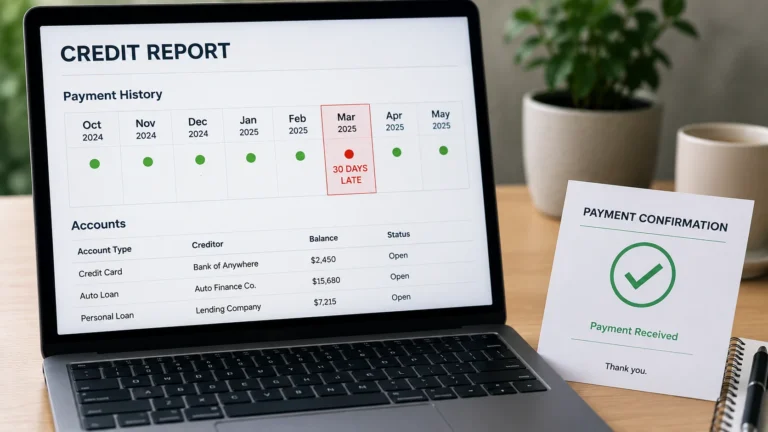
An incorrect late payment on credit report information may be disputable when the report says you were late but your records show the payment was made on time. Compare the specific month being reported with payment confirmations, lender account history, bank records, or other documents that show when the payment was received.
For example:
| Credit report shows | Your records show | Possible issue |
|---|---|---|
| March 2026: 30 days late | Payment received March 12, 2026 | Potentially inaccurate payment history that should be investigated |
Wrong Balance on Credit Report
A wrong balance on credit report information can be a valid reason to investigate, but first check the reporting date. Credit card balances on a credit report may reflect information reported by the creditor at a different point in the billing cycle than the balance you see today.
Compare the bureau’s reported balance and reporting date with the corresponding account statement. If the numbers still do not match when they should, document the difference before filing a dispute.
Wrong Account Status on Credit Report
A wrong account status on credit report can include an account reported as open when it is closed, an account incorrectly reported as delinquent, or an account relationship that is reported incorrectly. CFPB also identifies incorrect payment status, account ownership, and account dates as common reporting problems consumers should check.
Use account statements, payoff or closure records, payment history, or creditor correspondence to determine what the correct status should be.
Duplicate Account or Duplicate Debt
A duplicate account on credit report information may be an error when the same debt is incorrectly reported more than once. However, two entries that look similar are not automatically duplicates. Review the creditor or collector name, account identifiers, balances, dates, and status before deciding that the reporting is wrong.
The important question is not simply whether two entries look related. It is whether the report contains duplicated or otherwise inaccurate information.
Incorrect Personal Information and Mixed File Credit Report Errors
Mixed file credit report errors can occur when information belonging to two consumers is combined in one credit file. CFPB lists accounts belonging to another person with the same or a similar name as one example of this type of problem.
Wrong names, addresses, phone numbers, or someone else’s accounts can be clues that your file needs closer review. If information clearly belongs to another person, document each incorrect item separately rather than treating the entire report as one general dispute.
What Usually Does Not Count as a Credit Report Error?
A credit report mistake must involve information you believe is inaccurate or incomplete. Information can be damaging to your credit and still be correctly reported.
| Situation | Credit report accuracy error? | Why |
|---|---|---|
| You actually made a payment late | Usually no | Accurate negative payment history is not inaccurate simply because it hurts your credit. |
| Your credit card balance is high but correct | No | The balance may affect your credit profile, but accurate reporting is not an error. |
| A valid debt belongs to you and the details are accurate | No accuracy error based only on the debt being negative | A dispute is intended to challenge information you believe is inaccurate or incomplete. |
| A payment is reported late even though it was made on time | Potentially yes | The reported payment history may be inaccurate. |
| An account does not belong to you | Potentially yes | The account may involve identity theft or information belonging to another consumer. |
| The balance, status, limit, or account dates are wrong | Potentially yes | These are specific pieces of account information that can be checked against supporting records. |
If you are asking, can I dispute incorrect information on my credit report, the answer is yes: you have the right to dispute information you believe is inaccurate or incomplete. Before filing, identify each disputed item separately, explain exactly what is wrong, and determine what the correct information should be.
Quick test: Before moving forward, ask yourself: What exact information is wrong, what should it say instead, and what records can I use to check it? If you can answer those three questions, you are ready for the next step: reviewing your credit report systematically before preparing the dispute.
How to Check Your Credit Report for Errors
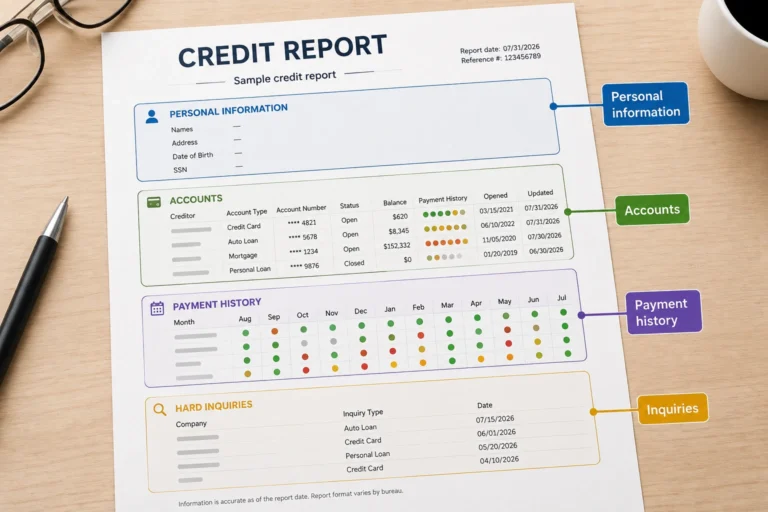
Before you dispute anything, check your credit report for errors carefully and identify the exact information that may be wrong. Do not rely only on your credit score. Your credit report contains the underlying account details, balances, payment history, account status, dates, and personal information you need to compare with your own records.
If you are trying to learn how to check your credit report for errors, review each questionable entry one field at a time. Look for accounts you do not recognize, incorrect late payments, balances that do not match the relevant account records, wrong account statuses, duplicate information, incorrect dates, or personal information that may belong to someone else.
When you check credit report for errors, the goal is not to find anything negative. The goal is to identify a specific piece of information that appears inaccurate or incomplete and determine what the report should show instead.
Credit Report Error Audit: What to Check
If you are wondering what to look for on credit report entries, start with the areas below. Review each field separately and compare questionable information with records from the same time period whenever possible.
| What to review | What to compare | Possible red flags |
|---|---|---|
| Personal information | Your name, addresses, and identifying information | Another person’s name, address, or identifying information appears in your file |
| Account ownership | Accounts you actually opened or are associated with | An account you do not recognize or never opened |
| Payment history | Account history, payment confirmations, and relevant bank records | A payment is reported late even though your records indicate it was paid on time |
| Account balance | The reported balance, reporting date, and corresponding account statement | The balance does not match the information that should have been reported for that date |
| Credit limit | Card issuer statements or account records | The reported credit limit differs from the issuer’s records |
| Account status | Open, closed, paid, delinquent, or other status in your account records | An open account is shown as closed, a closed account is shown as open, or the payment status appears inaccurate |
| Account dates | Opening, payment, closure, or other relevant account records | Important dates do not match your records |
| Collections and other negative accounts | Ownership, balance, dates, status, and account identifiers | The account is not yours, the amount is wrong, or information appears duplicated or otherwise inaccurate |
Review Every Credit Report That Shows the Information
When you review your credit report for errors, record which credit bureau is showing each questionable item. The same account may not appear exactly the same on every credit report, and an error may appear on only one report, on two reports, or across all three major credit bureaus.
A systematic review is the simplest approach for anyone researching how to review credit report for errors. For every possible problem, write down:
- the credit bureau reporting it;
- the creditor, lender, collector, or other furnisher name;
- the account number or available identifying information;
- the exact information currently reported;
- the date or month involved;
- what you believe the correct information should be.
If you are not sure what the balance, payment history, account status, or other fields mean, use our guide on how to read your credit report before deciding that an entry is inaccurate.
Check Your Personal Information
One of the first steps in how to find errors on credit report information is checking whether the personal details in the file actually belong to you. Review names, addresses, and other identifying information for details that appear unfamiliar or belong to another person.
An old address is not automatically evidence of a harmful reporting error, but unfamiliar identifying information combined with accounts you do not recognize deserves closer attention because it may point to a mixed-file or identity-theft problem.
Check Every Account You Recognize
To find errors on credit report entries, review each account individually instead of looking only at the overall credit score. For every account, check:
- Account ownership: Does the account actually belong to you?
- Balance: Does the reported amount make sense for the reporting date?
- Credit limit: Does it match the issuer’s records?
- Payment history: Are any months incorrectly marked late?
- Account status: Is the account correctly shown as open, closed, paid, delinquent, or otherwise?
- Dates: Do important account dates match your records?
Compare Suspicious Information With Your Own Records
The most useful way to find mistakes on your credit report is to compare the questionable entry with records from the same time period. Do not compare a balance reported several weeks ago with today’s balance and automatically assume the report is wrong. First check the reporting date and the corresponding statement or account history.
This comparison is also the core of how to check credit report for mistakes: identify what the report shows, identify what your records show for the relevant date, and determine whether there is a real factual difference that needs investigation.
Example: Reported Information vs. Your Records
| Field | Credit report shows | Your records show | What needs review |
|---|---|---|---|
| Payment history | March 2026: 30 days late | Payment received March 12, 2026 | Possible payment-history error |
| Balance | $2,480 | Relevant statement shows $480 | Check reporting date and balance records |
| Account status | Open | Account closed July 1 | Possible status error |
This is an illustrative example, not a real consumer credit report.
Use This Mini Credit Report Error Worksheet
| Question | Your answer |
|---|---|
| Which credit bureau reports the problem? | ____________________ |
| Which account or item is involved? | ____________________ |
| What does the credit report currently say? | ____________________ |
| What do your records show instead? | ____________________ |
| What exact field appears inaccurate? | ____________________ |
| Which records support your position? | ____________________ |
Save a Copy Before You File a Dispute
After you check credit report for mistakes and identify a specific problem, save a copy of the report before submitting the dispute. Keep a record of the bureau, account, disputed field, reporting date, and supporting documents you plan to use.
This gives you a clear before-and-after record. When the investigation is complete, you can compare the updated report with the version you originally reviewed and confirm whether the specific information was corrected, removed, or left unchanged.
Next step: Once you know exactly what the credit report says, what your records show instead, and which bureau is reporting the problem, you are ready to prepare the dispute step by step.
How to Check Your Credit Report for Errors
Before you dispute anything, check your credit report for errors carefully and identify the exact information that may be wrong. Do not rely only on your credit score. Your credit report contains the underlying account details, balances, payment history, account status, dates, and personal information you need to compare with your own records.
If you are trying to learn how to check your credit report for errors, review each questionable entry one field at a time. If you searched for how to check credit report for errors, the same rule applies: look for a specific factual difference between what the report shows and what your records show. Check for accounts you do not recognize, incorrect late payments, balances that do not match the relevant account records, wrong account statuses, duplicate information, incorrect dates, or personal information that may belong to someone else.
When you check credit report for errors, the goal is not to find anything negative. The goal is to identify a specific piece of information that appears inaccurate or incomplete and determine what the report should show instead.
Credit Report Error Audit: What to Check
If you are wondering what to look for on credit report entries, start with the areas below. Review each field separately and compare questionable information with records from the same time period whenever possible.
| What to review | What to compare | Possible red flags |
|---|---|---|
| Personal information | Your name, addresses, and identifying information | Another person’s name, address, or identifying information appears in your file |
| Account ownership | Accounts you actually opened or are associated with | An account you do not recognize or never opened |
| Payment history | Account history, payment confirmations, and relevant bank records | A payment is reported late even though your records indicate it was paid on time |
| Account balance | The reported balance, reporting date, and corresponding account statement | The balance does not match the information that should have been reported for that date |
| Credit limit | Card issuer statements or account records | The reported credit limit differs from the issuer’s records |
| Account status | Open, closed, paid, delinquent, or other status in your account records | An open account is shown as closed, a closed account is shown as open, or the payment status appears inaccurate |
| Account dates | Opening, payment, closure, or other relevant account records | Important dates do not match your records |
| Collections and other negative accounts | Ownership, balance, dates, status, and account identifiers | The account is not yours, the amount is wrong, or information appears duplicated or otherwise inaccurate |
Review Every Credit Report That Shows the Information
When you review your credit report for errors, record which credit bureau is showing each questionable item. The same account may not appear exactly the same on every credit report, and an error may appear on only one report, on two reports, or across all three major credit bureaus.
A systematic review is the simplest approach for anyone researching how to review credit report for errors. For every possible problem, write down:
- the credit bureau reporting it;
- the creditor, lender, collector, or other furnisher name;
- the account number or available identifying information;
- the exact information currently reported;
- the date or month involved;
- what you believe the correct information should be.
If you are not sure what the balance, payment history, account status, or other fields mean, use our guide on how to read your credit report before deciding that an entry is inaccurate.
Check Your Personal Information
One of the first steps in how to find errors on credit report information is checking whether the personal details in the file actually belong to you. Review names, addresses, and other identifying information for details that appear unfamiliar or belong to another person.
An old address is not automatically evidence of a harmful reporting error, but unfamiliar identifying information combined with accounts you do not recognize deserves closer attention because it may point to a mixed-file or identity-theft problem.
Check Every Account You Recognize
To find errors on credit report entries, review each account individually instead of looking only at the overall credit score. For every account, check:
- Account ownership: Does the account actually belong to you?
- Balance: Does the reported amount make sense for the reporting date?
- Credit limit: Does it match the issuer’s records?
- Payment history: Are any months incorrectly marked late?
- Account status: Is the account correctly shown as open, closed, paid, delinquent, or otherwise?
- Dates: Do important account dates match your records?
Compare Suspicious Information With Your Own Records
The most useful way to find mistakes on your credit report is to compare the questionable entry with records from the same time period. For anyone searching how to find mistakes on credit report entries, this comparison is the key step: do not assume that a difference automatically means an error until you have checked the relevant reporting date, statement, and account history.
Do not compare a balance reported several weeks ago with today’s balance and automatically assume the report is wrong. First check the reporting date and the corresponding statement or account history.
This comparison is also the core of how to check credit report for mistakes: identify what the report shows, identify what your records show for the relevant date, and determine whether there is a real factual difference that needs investigation.
Example: Reported Information vs. Your Records
| Field | Credit report shows | Your records show | What needs review |
|---|---|---|---|
| Payment history | March 2026: 30 days late | Payment received March 12, 2026 | Possible payment-history error |
| Balance | $2,480 | Relevant statement shows $480 | Check reporting date and balance records |
| Account status | Open | Account closed July 1 | Possible status error |
This is an illustrative example, not a real consumer credit report.
Use This Mini Credit Report Error Worksheet
| Question | Your answer |
|---|---|
| Which credit bureau reports the problem? | ____________________ |
| Which account or item is involved? | ____________________ |
| What does the credit report currently say? | ____________________ |
| What do your records show instead? | ____________________ |
| What exact field appears inaccurate? | ____________________ |
| Which records support your position? | ____________________ |
Save a Copy Before You File a Dispute
After you check credit report for mistakes and identify a specific problem, save a copy of the report before submitting the dispute. Keep a record of the bureau, account, disputed field, reporting date, and supporting documents you plan to use.
This gives you a clear before-and-after record. When the investigation is complete, you can compare the updated report with the version you originally reviewed and confirm whether the specific information was corrected, removed, or left unchanged.
Next step: Once you know exactly what the credit report says, what your records show instead, and which bureau is reporting the problem, you are ready to prepare the dispute step by step.
How to Dispute Errors on Your Credit Report Step by Step
Once you have identified a specific mistake, the next step is to dispute it clearly and support your position with relevant records. If you are researching how to dispute errors on your credit report, the process is much easier when you break the problem into individual fields instead of simply telling a credit bureau that your entire report is wrong.
The basic credit report dispute process is to identify the exact information you believe is inaccurate or incomplete, explain what should be reported instead, gather supporting documents, and submit the dispute to the credit reporting company showing the information. The Consumer Financial Protection Bureau says that fixing a credit report error generally means contacting both the credit reporting company and the company that furnished the disputed information.
This step-by-step process also applies if you are trying to understand how to dispute credit report errors, how to correct errors on credit report information, or how to fix incorrect information on credit report entries.
Step 1: Identify the Exact Information You Are Disputing
The first rule when disputing errors on your credit report is to be specific. A statement such as “My credit report is wrong” does not clearly identify what needs to be investigated.
Instead, identify:
- the credit bureau reporting the information;
- the creditor, lender, collection agency, or other furnisher;
- the account or identifying information;
- the exact field you believe is inaccurate;
- the month, date, balance, payment status, or account status involved;
- why you believe the information is wrong.
Weak vs. Strong Credit Report Dispute
| Weak dispute | More specific dispute |
|---|---|
| My credit report is wrong. | The March 2026 payment status for account ending 1234 is reported as 30 days late. My records show the payment was received on March 12, 2026. |
| This balance is incorrect. | The report shows a balance of $2,480. The account statement for the relevant reporting period shows a balance of $480. |
| This account should not be here. | I do not recognize this account and do not believe it belongs to me. I am disputing the ownership of this account. |
Step 2: Write Down What Should Be Reported Instead
Before you file anything, create a simple side-by-side comparison. This forces you to define the correction you are requesting and can make the dispute easier to understand.
| Field | Credit report shows | Your records show | Requested correction |
|---|---|---|---|
| Payment status | March 2026: 30 days late | Payment received March 12, 2026 | Correct March payment history if the late mark is inaccurate |
| Balance | $2,480 | $480 for the corresponding statement period | Correct the balance if reporting records confirm the discrepancy |
| Account status | Open | Closed July 1, 2026 | Update the account status if the reported status is inaccurate |
These are illustrative examples, not real consumer credit reports.
Step 3: Gather Evidence for Your Credit Report Dispute
A good dispute should identify the disputed information and include records that support your position when available. The documents you need depend on the type of error.
| Possible error | Records that may help |
|---|---|
| Incorrect late payment | Payment confirmation, account payment history, relevant bank record, creditor correspondence |
| Wrong balance | Account statement, payment record, payoff information, creditor records |
| Incorrect account status | Closure letter, payoff record, account history, creditor communication |
| Account that is not yours | Relevant identity and account records; identity-theft documentation when applicable |
| Incorrect personal information | Appropriate identity or address documentation |
Send or upload only documents that are relevant to the specific dispute. If you need a more detailed evidence guide, see documents that can support a credit report dispute.
If you send documents by mail, keep the originals and provide copies. Keep another complete copy of your dispute package for your own records.
Step 4: Decide Who Should Receive the Dispute
If you are wondering how to dispute a credit report when a lender or collector supplied the incorrect information, do not focus only on the credit bureau. CFPB guidance says correcting an error generally involves contacting both the credit reporting company and the company that furnished the information.
Credit Bureau or Furnisher? Use This Route Table
| Situation | Credit bureau | Furnisher | Recommended route |
|---|---|---|---|
| Wrong payment history supplied by a lender | Yes | Yes | Dispute the inaccurate information with the bureau showing it and the furnisher that supplied it. |
| Wrong balance supplied by a creditor | Yes | Yes | Identify the balance and reporting period clearly and provide relevant records. |
| Error appears on only one credit report | Yes — that bureau | Usually relevant if it supplied the disputed data | Dispute with the bureau showing the error and address the furnisher as appropriate. |
| Same incorrect information appears on two reports | Yes — both reporting bureaus | Yes, when the furnisher supplied the information | File with each bureau displaying the disputed information. |
| Same incorrect information appears on all three reports | Yes — each bureau showing it | Yes, when applicable | Do not assume one bureau dispute automatically replaces the others. |
| Account does not belong to you | Yes | Depends on the source | Investigate whether identity theft or a mixed-file problem is involved before treating it as a routine balance dispute. |
Step 5: Choose How to File Your Credit Report Dispute
Credit reporting companies provide ways to submit disputes directly. Depending on the bureau and your situation, you may be able to submit the dispute online or by mail. Your choice may depend on the complexity of the error, the documents you need to provide, and how you want to preserve your records.
| Method | May be useful when | Record to keep |
|---|---|---|
| Online | You want to upload documents electronically and use the bureau’s dispute system. | Confirmation number, screenshots or saved submission details, uploaded documents, result notices |
| You want a physical copy of the exact explanation and supporting documents you sent. | Copy of the letter, attachments, mailing receipt, and delivery record |
For a detailed comparison before choosing a filing method, see dispute a credit report online or by mail.
Step 6: Write a Clear Credit Report Dispute Explanation
You do not need to write a dramatic story. A useful dispute explanation identifies the item, states the facts, explains why you believe the information is inaccurate or incomplete, and tells the recipient what correction you are requesting.
Fill-In Credit Report Dispute Template
Account: [creditor or furnisher name / account identifier]
Information currently reported: [describe exactly what appears on your credit report]
Why I believe it is inaccurate or incomplete: [give the specific factual reason]
Correct information: [describe what your records show instead]
Supporting documents: [list the copies or records you are providing]
Requested action: Please investigate this information and correct or remove the disputed information as appropriate based on the investigation.
Example of a Specific Dispute Explanation
The March 2026 payment status for account ending 1234 is reported as 30 days late. My records show that the payment was received on March 12, 2026. I have included a copy of the payment confirmation and the relevant account record. Please investigate the March 2026 payment status and correct it if the reported late payment is inaccurate.
This is an illustrative example only. Your dispute should describe the facts and records specific to your situation.
Step 7: Submit the Dispute and Save Your Records
After submitting the dispute, do not throw away the paperwork or rely on your memory. Create a dispute record that lets you reconstruct exactly what happened later.
Save These Dispute Records
- a copy of the credit report before the dispute;
- the exact information you disputed;
- the dispute explanation you submitted;
- copies of every supporting document;
- the submission date;
- the bureau and furnisher involved;
- the online confirmation number, if applicable;
- mailing and delivery records, if applicable;
- every response or result you receive;
- the updated credit report after the investigation, if one is provided or obtained.
Credit Report Dispute Preparation Checklist
| Before submitting | Ready? |
|---|---|
| I identified the exact disputed account or item. | □ |
| I wrote down exactly what the report currently says. | □ |
| I identified what I believe the correct information should be. | □ |
| I checked the relevant reporting date or payment period. | □ |
| I gathered documents that directly support my position. | □ |
| I identified every credit bureau showing the error. | □ |
| I identified the company that furnished the disputed information when applicable. | □ |
| I wrote a short, factual dispute explanation. | □ |
| I made copies of everything I plan to submit. | □ |
| I have a system for saving the confirmation and dispute result. | □ |
Next step: Filing the dispute is not the end of the process. After submission, track the investigation, save the response, and compare the result with the exact information you originally challenged.
Credit Report Dispute Example: From Error to Submission

A practical credit report dispute example makes the process much easier to understand. Instead of looking at a vague complaint such as “my credit report is wrong,” you can see how to identify one specific error, match it with supporting records, write a factual explanation, and prepare the dispute for submission.
The example below shows how to dispute incorrect information on credit report data when a payment is reported late but the consumer’s records appear to show that the payment was received on time. This is an illustrative example only and is not a real consumer credit report.
Example: An Incorrect Late Payment
| Credit report field | Information shown |
|---|---|
| Creditor | Example Bank |
| Account | Ending 1234 |
| Month | March 2026 |
| Payment status | 30 days late |
| Reported balance | $1,240 |
Illustrative example — not a real consumer credit report.
What the Consumer’s Records Show
| Record | What it shows | Why it matters |
|---|---|---|
| Payment confirmation | Payment received March 12, 2026 | May help establish when the payment was received |
| Account payment history | March payment recorded as received | Provides account-level information for the disputed month |
| Relevant bank record | Payment transaction completed | May provide additional support for the payment record |
Step 1: Identify the Exact Disputed Information
In this credit dispute example, the consumer is not disputing the entire account. The specific disputed field is:
March 2026 payment status — reported as 30 days late.
That distinction matters. CFPB guidance recommends identifying each disputed item separately and explaining what you believe is wrong rather than submitting a general complaint about the entire credit report.
Step 2: State What Your Records Show Instead
The consumer’s records appear to show:
Payment received March 12, 2026.
The dispute can now be framed as a factual comparison:
| Credit report shows | Consumer records show | Information to investigate |
|---|---|---|
| March 2026: 30 days late | Payment received March 12, 2026 | Whether the March payment status was reported accurately |
Step 3: Match the Evidence to the Error
A useful credit report error dispute example should show why each document is included. More paperwork is not automatically better. The goal is to provide records that relate directly to the information being disputed.
| Disputed issue | Relevant evidence | Purpose |
|---|---|---|
| March payment reported 30 days late | Payment confirmation | Shows the recorded payment date |
| March payment reported 30 days late | Relevant account payment history | Shows how the creditor recorded the payment |
| March payment reported 30 days late | Relevant bank record, if useful | Provides additional transaction evidence |
The CFPB and FTC recommend including copies of documents that support your dispute and keeping the originals for your own records.
Step 4: Write the Credit Report Dispute Explanation
If you are wondering what to write in a credit report dispute, keep the explanation short, factual, and tied to the exact information you are challenging.
Sample Credit Report Dispute
The March 2026 payment status for Example Bank account ending 1234 is reported as 30 days late. My records show that the payment was received on March 12, 2026. I am providing copies of the relevant payment confirmation and account record. Please investigate the March 2026 payment status and correct it if the reported late payment is inaccurate.
This sample credit report dispute is meant to show the structure, not language that should be copied blindly. Your own dispute should describe the actual account, date, reported information, and supporting records in your situation.
Step 5: Build the Dispute Packet
Before submitting the dispute, put the relevant materials together in one organized packet. This makes it easier to see whether anything important is missing.
| Dispute packet item | Include? | Purpose |
|---|---|---|
| Copy or saved version of the credit report | ✓ | Shows the information as it appeared before the dispute |
| Disputed item clearly identified | ✓ | Shows exactly what information you want investigated |
| Short factual dispute explanation | ✓ | Explains why you believe the information is inaccurate |
| Relevant payment confirmation | ✓ | Supports the claimed payment date |
| Relevant account history | ✓ | Provides supporting account information |
| Copies of any additional relevant records | If needed | Adds support only when directly related to the disputed item |
| Copy of everything submitted | ✓ | Creates a complete record for follow-up |
Step 6: Decide Where to Submit the Dispute
For this example, the consumer should identify every credit reporting company that displays the disputed late payment. CFPB guidance says consumers should dispute errors with the credit reporting company showing the information and generally also address the company that furnished the disputed information.
If the late payment appears on more than one credit report, do not assume that submitting a dispute with one bureau automatically files the same dispute with every other bureau showing the error.
Step 7: Track the Dispute After Submission
A strong example of credit report dispute preparation does not end when the dispute is submitted. Record the submission details so you can compare the final response with what you originally challenged.
Credit Dispute Tracking Worksheet
| Tracking field | Record it here |
|---|---|
| Credit bureau | ____________________ |
| Furnisher | ____________________ |
| Account | ____________________ |
| Exact disputed field | ____________________ |
| Date submitted | ____________________ |
| Submission method | Online / Mail / Other |
| Confirmation or tracking number | ____________________ |
| Documents submitted | ____________________ |
| Result received | ____________________ |
| Updated report checked | Yes / No |
What This Credit Dispute Example Teaches You
The most important lesson from this credit dispute example letter is not the exact wording. It is the structure:
- Identify one specific disputed item.
- State what the credit report shows.
- State what your records show instead.
- Attach relevant supporting documents.
- Ask for the disputed information to be investigated and corrected if inaccurate.
- Save a complete record of what you submitted.
- Review the result and updated credit report.
Next step: Once your dispute is prepared, make sure you submit it to the correct credit bureau or bureaus. The next section explains what to do when the incorrect information appears on Experian, Equifax, or TransUnion.
Where to File a Credit Report Dispute
Once you have identified the exact error and gathered supporting records, file the dispute with the credit reporting company that shows the inaccurate or incomplete information. If the same error appears on more than one report, identify every bureau reporting it rather than assuming that a dispute with one bureau automatically covers the others.
The three nationwide credit reporting companies are Experian, Equifax, and TransUnion. CFPB guidance also says that fixing a credit report error generally means contacting both the credit reporting company and the company that furnished the disputed information, such as a lender, credit card issuer, or collection agency.
Which Credit Bureau Should You Dispute With?
| Where the error appears | What to do |
|---|---|
| Experian only | Dispute the inaccurate information with Experian and consider disputing it with the furnisher that supplied the information. |
| Equifax only | Dispute the inaccurate information with Equifax and consider contacting the furnisher. |
| TransUnion only | Dispute the inaccurate information with TransUnion and consider contacting the furnisher. |
| Experian and Equifax | Address the disputed information with both bureaus that show it. |
| Two different bureaus | File with each bureau reporting the inaccurate information. |
| All three credit reports | Address Experian, Equifax, and TransUnion separately when each report contains the disputed information. |
| The lender, creditor, or collector supplied the wrong information | Dispute the information with the bureau or bureaus showing it and also address the furnisher as appropriate. |
Experian Credit Report Is Wrong: What to Do
If your Experian credit report is wrong, identify the exact Experian account, payment, balance, status, date, or personal information you believe is inaccurate or incomplete. Do not submit a general statement that the entire report is wrong. Match the disputed information with records that show why you believe it needs to be corrected.
If my Experian credit report is wrong describes your situation, use this simple process:
- Open the Experian report containing the problem.
- Identify the specific disputed entry.
- Write down what Experian currently reports and what your records show instead.
- Gather relevant supporting documents.
- Submit the dispute through an official Experian dispute channel.
- Save the confirmation and track the result.
Experian provides an official online Dispute Center where consumers can submit disputes, upload supporting documents, and track dispute status. If you find Experian credit report errors involving information that came from a lender or another data furnisher, contacting that furnisher may also be appropriate.
For Experian report incorrect information, use the official Experian dispute resource: Experian Dispute Center.
Equifax Credit Report Incorrect: What to Do
If your Equifax credit report is incorrect, start with the specific field that appears wrong. Compare the Equifax entry with the corresponding account records before submitting a dispute.
If you are thinking, “my Equifax report is wrong,” record:
- the creditor or furnisher;
- the account or identifying information;
- the exact Equifax information you believe is wrong;
- what your records show instead;
- the documents that support your position.
An Equifax credit report mistake may involve an incorrect balance, payment history, account status, ownership information, or another specific item that you believe is inaccurate or incomplete. Equifax provides a free dispute process through myEquifax and allows consumers to check the status of a previously filed dispute.
If your Equifax credit report is wrong, use the official dispute resource rather than relying on a third-party credit repair service: Equifax Credit Dispute.
TransUnion Credit Report Is Wrong: What to Do
If your TransUnion credit report is wrong, identify the specific information that needs investigation and gather records supporting the correction. TransUnion allows consumers to dispute information through its official Service Center and also provides other dispute methods for eligible situations.
For a TransUnion credit report error, use the same basic preparation process:
- Identify the exact TransUnion entry.
- Determine what information you believe is inaccurate or incomplete.
- Compare it with your supporting records.
- Submit the dispute through an official TransUnion channel.
- Save the submission details and review the investigation result.
If you are researching how to dispute TransUnion credit report information, use the official TransUnion dispute center: TransUnion Credit Disputes.
What If the Same Error Appears on More Than One Credit Report?
A credit report error can appear on one, two, or all three nationwide credit reports. If the same inaccurate information appears on several reports, keep a separate record of where the problem appears and address each credit reporting company showing the disputed information.
| Experian | Equifax | TransUnion | Action |
|---|---|---|---|
| Yes | No | No | Dispute with Experian. |
| No | Yes | No | Dispute with Equifax. |
| No | No | Yes | Dispute with TransUnion. |
| Yes | Yes | No | Address both Experian and Equifax. |
| Yes | No | Yes | Address both Experian and TransUnion. |
| No | Yes | Yes | Address both Equifax and TransUnion. |
| Yes | Yes | Yes | Address all three bureaus reporting the disputed information. |
Do You Also Need to Contact the Furnisher?
Often, yes. A furnisher is the company that supplied information to the credit reporting company, such as a bank, lender, credit card issuer, landlord, or collection agency. CFPB guidance says correcting an error generally means contacting both the credit reporting company and the company that provided the information.
For example, if a lender reports a payment as late and that late payment appears on Experian and Equifax, you may need to address the inaccurate reporting with Experian, Equifax, and the lender that furnished the payment information.
Next step: After your dispute has been submitted to the correct bureau or bureaus, track the investigation period carefully. The next section explains how long a credit report dispute can take, when the standard 30-day timeline applies, when additional time may be allowed, and what to do if you do not receive a timely response.
How Long Does a Credit Report Dispute Take?
A credit report dispute generally takes up to 30 days after the credit reporting company receives your dispute. In certain situations, the investigation period can extend to 45 days. After the investigation is completed, the credit reporting company generally has five business days to notify you of the results.
If you are wondering how long does a credit report dispute take or how long does a credit dispute take, the most important date is not necessarily the day you started writing the dispute. Under the Fair Credit Reporting Act, the standard 30-day reinvestigation period generally begins when the consumer reporting agency receives notice of the dispute.
Credit Report Dispute Timeline
Use this credit report dispute timeline to track the process from submission through the investigation result.
| Stage | Typical timing | What you should do |
|---|---|---|
| Dispute submitted | Day you file or mail it | Save a copy of the dispute, supporting documents, and submission details. |
| Credit reporting company receives the dispute | Day 0 for the general investigation period | Save the online confirmation or mail delivery record so you know when the dispute was received. |
| Standard investigation period | Generally up to 30 days | Monitor your email, mail, or dispute account for requests or updates. |
| Additional relevant information submitted during the investigation | May allow an extension of up to 15 additional days in applicable cases | Record the date you submitted the additional information and keep a copy. |
| Investigation completed | Generally within the applicable 30- or 45-day period | Review the result carefully and compare it with the exact information you disputed. |
| Results notice | Generally within five business days after the investigation is completed | Save the notice and review any updated credit report you receive. |
How Long Do Credit Bureaus Have to Investigate a Dispute?
If you are asking how long do credit bureaus have to investigate a dispute, the general rule is 30 days after the credit reporting company receives notice of the dispute. The Fair Credit Reporting Act allows the 30-day reinvestigation period to be extended by no more than 15 additional days in certain circumstances when the consumer provides information relevant to the reinvestigation during the original 30-day period.
That is why a credit dispute 30 days timeline is the general starting point, while a credit dispute 45 days timeline can apply in certain cases.
When Can a Credit Report Dispute Take Up to 45 Days?
A dispute can take longer than the general 30-day period in certain circumstances. According to the Consumer Financial Protection Bureau, a credit reporting company may have up to 45 days to investigate in situations that include:
- you file the dispute after receiving your free annual credit report; or
- you provide additional information relevant to the dispute during the original 30-day investigation period, which may allow the investigation period to be extended by up to 15 additional days.
The FCRA also limits when the additional 15-day extension applies. For example, the statutory extension does not apply in the same way when the disputed information has already been found inaccurate or incomplete, or the consumer reporting agency determines that it cannot be verified during the original 30-day period.
When Does the 30-Day Credit Dispute Clock Start?
The general 30-day period begins when the credit reporting company receives notice of the dispute. This distinction matters if you submit a dispute by mail because the mailing date and delivery date may not be the same.
| How you submitted the dispute | What to save |
|---|---|
| Online | Submission date, confirmation number, copies or screenshots of what you submitted, and uploaded documents |
| Copy of the dispute letter, supporting documents, mailing receipt, and delivery or tracking information |
Keeping this record can help you determine when the applicable investigation period began instead of guessing based only on the date you prepared the dispute.
How Many Days Does a Credit Bureau Have to Respond?
If you are asking how many days does a credit bureau have to respond, separate the investigation period from the results notice. The credit reporting company generally has 30 days to investigate after receiving the dispute, subject to applicable extensions, and generally has five business days after completing the investigation to notify you of the results.
Do not assume that an item must automatically disappear simply because 30 calendar days have passed since you clicked submit or mailed a letter. First verify when the dispute was received, whether an extension may apply, and whether additional information was submitted during the investigation.
How Long Does an Experian Dispute Take?
For consumers asking how long does Experian dispute take, the same federal investigation framework generally applies: a credit reporting company generally must investigate a dispute within 30 days of receiving it, with up to 45 days possible in certain circumstances. Track the actual submission and result through Experian’s official dispute system and save your confirmation details.
How Long Does an Equifax Dispute Take?
If you are wondering how long does Equifax dispute take, use the same 30-day general investigation period as your starting point, while recognizing that certain disputes may have a longer applicable period. Keep your Equifax confirmation information and record any additional documents you submit after the investigation begins.
How Long Does a TransUnion Dispute Take?
For how long does TransUnion dispute take, the federal framework is also generally 30 days after receipt of the dispute, with up to 45 days possible in certain circumstances. Save your TransUnion submission details so you can determine when the investigation began and when to expect the result.
Use This Credit Dispute Deadline Tracker
Instead of trying to remember when each deadline should occur, record the dates as the dispute moves through the process.
| Dispute tracking field | Your information |
|---|---|
| Credit bureau | ____________________ |
| Dispute submitted | ____________________ |
| Dispute received by bureau | ____________________ |
| 30-day point | ____________________ |
| Additional relevant information submitted | ____________________ |
| Date additional information was submitted | ____________________ |
| Possible extended investigation deadline | ____________________ |
| Investigation result received | ____________________ |
| Updated credit report reviewed | Yes / No |
What If the Credit Bureau Does Not Respond Within 30 Days?
If the expected investigation period has passed and you have not received a result, first confirm when the bureau received your dispute and whether a longer investigation period may apply. Do not assume automatically that the disputed item must be deleted simply because 30 days have passed.
If you are still waiting after the applicable investigation period, use our guide on what to check when a credit bureau did not respond within 30 days.
Next step: The deadline tells you when to expect the investigation to be completed, but the result can mean several different things. The next section explains what to do if the disputed information is corrected, removed, verified as accurate, or left unresolved.
What Happens After You Dispute a Credit Report Error?
After you file a dispute, the credit reporting company investigates the information and sends you the credit report dispute results. The result may show that the disputed information was corrected, removed, verified as accurate, or left unresolved. Do not judge the outcome only by seeing that the dispute is marked “completed.” Compare the actual information on your credit report before and after the investigation.
If you are wondering what happens after a credit dispute, your next step depends on the result. Use the navigator below to identify what happened and what you should check next.
Credit Dispute Result Navigator
| Your dispute result | What it generally means | What to do next |
|---|---|---|
| Corrected | The disputed information was changed after the investigation. | Compare the corrected field with your records and save the updated report. |
| Removed | The disputed item was deleted from the report. | Confirm that the item is actually gone and check whether it appears on another credit report. |
| Verified as accurate | The information remained after the investigation. | Review the result, compare it with your evidence, and decide whether another supported next step is appropriate. |
| Denied, rejected, or unresolved | The correction you requested did not occur, or the dispute did not resolve the problem. | Read the explanation, identify what remains wrong, and determine whether additional relevant evidence or another dispute route is appropriate. |
| Removed and later reappeared | Information that was previously deleted appears on the report again. | Check whether the item was reinserted and whether the required reinsertion notice was provided. |
| No result within the expected period | The investigation timeline may need closer review. | Confirm when the dispute was received and whether an extension or other procedural rule applied. |
The Information Was Corrected
If the disputed information was corrected, do not stop at the word “corrected.” Open the updated credit report and verify the exact field that you challenged.
If you are asking what happens if credit dispute is successful, use this quick check:
- Open the updated credit report.
- Find the exact account and field you disputed.
- Compare the new information with your supporting records.
- Confirm that the correction matches the facts.
- Save the updated report and dispute result.
- Check whether the same error still appears on another bureau’s report.
Before-and-After Dispute Check
| Field | Before dispute | After dispute | Correct now? |
|---|---|---|---|
| Payment status | 30 days late | ________________ | Yes / No |
| Balance | $2,480 | ________________ | Yes / No |
| Account status | Open | ________________ | Yes / No |
| Account ownership | Reported as yours | ________________ | Yes / No |
This is an illustrative worksheet, not a real consumer credit report.
A successful correction does not guarantee a specific increase in your credit score. Credit scores depend on the information in your credit files and the scoring model being used, so the important first step is confirming that the underlying credit report information is now accurate.
The Credit Dispute Item Was Removed
If a credit dispute item was removed, confirm the deletion on the actual credit report rather than relying only on a status message or email. An item removed after a credit dispute should be checked carefully so you know whether the entire item disappeared or only part of the reported information changed.
Check:
- whether the item is completely gone;
- whether only part of the account information changed;
- whether the same information remains on another bureau’s report;
- whether any related balance, payment status, or collection entry still appears;
- whether the item later reappears.
Save the updated credit report and your original dispute records. Removal also does not guarantee a specific credit-score increase because the effect depends on the information that changed and the scoring model evaluating your credit file.
The Credit Dispute Was Verified as Accurate
A credit dispute verified as accurate result means the disputed information remained on your credit report after the investigation. It does not mean you should automatically file the identical dispute again.
If you are asking dispute verified as accurate what next, review four things:
- What exactly did you dispute? Make sure the original dispute identified the correct account, field, and date.
- What evidence did you provide? Check whether the documents directly addressed the disputed information.
- What does the result actually say? Read the bureau’s response instead of assuming “verified” explains every detail of the investigation.
- Do you have new or stronger relevant information? If so, determine the appropriate next step rather than repeating the same unsupported claim.
If the credit bureau says the information is accurate but you still believe a factual error remains, use our detailed guide on what to do when an item is verified as accurate after a credit dispute.
Your Credit Dispute Was Denied, Rejected, or Not Resolved
If you are asking what if credit dispute is denied, credit dispute rejected what next, or credit dispute denied what can I do, start by identifying why the requested correction did not happen. A completed dispute does not necessarily mean the underlying problem was resolved.
A disputed item not removed does not automatically mean you have no further options. First determine whether the information was verified, whether your evidence addressed the exact disputed field, and whether the furnisher should also be contacted.
If the credit bureau won’t fix error information that you still believe is inaccurate, review:
- the exact result notice;
- the account and field you originally disputed;
- the documents you submitted;
- whether the dispute clearly explained the factual problem;
- whether the furnisher should also be contacted;
- whether you have additional relevant information that was not included before.
If your dispute completed but nothing changed, do not simply send the same dispute repeatedly without understanding the result. See our guide on what to do if your credit dispute is denied for a more detailed next-step process.
The Disputed Item Was Removed and Then Came Back
If a disputed item removed then came back, or a deleted item came back on credit report after the dispute, the situation is different from an ordinary unsuccessful dispute. A credit report item reappeared after dispute may involve reinsertion rules under the Fair Credit Reporting Act.
Under the FCRA, information deleted after a reinvestigation generally may not be reinserted unless the furnisher certifies that the information is complete and accurate. If previously deleted information is reinserted, the consumer reporting agency must provide notice within five business days and include certain information required by law.
Reappeared Item Quick Check
| Question | Your answer |
|---|---|
| Was this exact item previously deleted after your dispute? | Yes / No |
| When did it reappear? | ____________________ |
| Did you receive a reinsertion notice? | Yes / No / Not sure |
| Which bureau shows the reinserted information? | ____________________ |
| Which furnisher is associated with the item? | ____________________ |
| Does the reinserted information match what appeared before? | Yes / No / Not sure |
If a disputed item was removed and then came back, use our dedicated guide to check the reinsertion, notice, furnisher, and next steps.
The Bureau Did Not Resolve the Dispute
If a dispute remains unresolved, federal law provides additional rights. For a dispute submitted to a credit reporting company, you may ask to have a brief statement describing the dispute added to your credit file and included or summarized in future credit reports.
Depending on the facts, additional options can also include contacting the furnisher, submitting additional relevant evidence, filing a complaint with the Consumer Financial Protection Bureau, or seeking legal advice when appropriate.
Do Not Confuse “Completed” With “Fixed”
The most important question after receiving credit dispute results is not whether the dispute dashboard says “completed.” Ask:
| Question | What you are checking |
|---|---|
| Was the specific disputed field changed? | Compare the old report with the updated report. |
| Does the new information match your records? | Verify the correction rather than assuming it is correct. |
| Was the entire item removed? | Confirm that it is no longer present. |
| Was the information verified as accurate? | Review the result and your original evidence. |
| Did nothing change? | Determine why the dispute did not resolve the issue. |
| Did a deleted item reappear? | Check the reinsertion details and any notice you received. |
Credit Dispute Result Action Plan
| Your result | Your next action |
|---|---|
| Corrected | Verify the exact correction and save the updated report. |
| Removed | Confirm deletion, save the report, and check other bureaus. |
| Verified as accurate | Review the result and evidence before deciding whether another supported step is appropriate. |
| Denied or unresolved | Identify why the problem remains and choose the appropriate follow-up route. |
| Removed then reappeared | Check whether the reinsertion requirements and notice were followed. |
| No timely result | Verify the applicable investigation deadline before deciding what to do next. |
Bottom line: If you are wondering what happens after you dispute a credit report or what happens when you dispute a credit report, always compare the result with the actual credit report. The dispute is truly useful only when you understand whether the specific information was corrected, removed, verified, reinserted, or left unresolved.
Next step: Keep all of your dispute information in one place. The next section provides a credit report dispute worksheet you can use to record the error, evidence, bureau, furnisher, submission date, deadline, result, and follow-up action.
Free Credit Report Dispute Worksheet
Use this free credit report dispute worksheet to organize the error, supporting evidence, credit bureau, furnisher, submission date, investigation deadline, result, and follow-up action in one place. A simple credit dispute worksheet can help you see whether your dispute is actually ready to submit before you contact a credit bureau or furnisher.
This credit report dispute worksheet is not an official Experian, Equifax, or TransUnion form. It is a preparation and tracking tool you can use alongside the bureau’s official dispute process.
Part 1: Identify the Credit Report Error
Start by recording the exact information you believe is inaccurate or incomplete. The purpose of this credit report error checklist is to turn a general concern such as “my credit report is wrong” into one specific, documented issue.
| Field | Your information |
|---|---|
| Credit bureau | Experian / Equifax / TransUnion |
| Credit report date | ____________________________ |
| Furnisher | ____________________________ |
| Creditor or company name | ____________________________ |
| Account number or identifying information | ____________________________ |
| Exact disputed field | ____________________________ |
| What the credit report says | ____________________________ |
| What you believe is correct | ____________________________ |
| Why you believe the information is inaccurate or incomplete | ____________________________ |
| Date or reporting period involved | ____________________________ |
| Does the same error appear on another bureau’s report? | Yes / No / Not checked |
Part 2: Credit Report Dispute Checklist
Use this credit report dispute checklist to match the disputed information with records that may support your position. You do not need every type of document listed below. Include records that are relevant to the specific error you are challenging.
| Possible supporting record | Do you have it? | Relevant to this dispute? |
|---|---|---|
| Copy or saved version of the credit report showing the error | Yes / No | Yes / No |
| Account statement | Yes / No | Yes / No |
| Payment confirmation | Yes / No | Yes / No |
| Bank or transaction record | Yes / No | Yes / No |
| Creditor or lender correspondence | Yes / No | Yes / No |
| Collection correspondence | Yes / No | Yes / No |
| Account closure or payoff confirmation | Yes / No | Yes / No |
| Identity documentation, if relevant | Yes / No | Yes / No |
| Court or legal record, if relevant | Yes / No | Yes / No |
| Other relevant evidence | ________________ | Yes / No |
This credit dispute checklist should help you answer one key question: does each document actually support the exact information you are disputing?
Part 3: Write Your Dispute in One Sentence
Before submitting anything, try to explain the dispute in one clear sentence. This field turns the worksheet into a practical credit report dispute template for organizing the facts without replacing an official bureau form or a separate dispute letter.
| Prompt | Your answer |
|---|---|
| The credit report currently says: | ____________________________________________________________
____________________________________________________________ |
| My records show: | ____________________________________________________________
____________________________________________________________ |
| I am asking the information to be investigated because: | ____________________________________________________________
____________________________________________________________ |
| The records supporting my position are: | ____________________________________________________________
____________________________________________________________ |
Part 4: Credit Dispute Submission Tracker
After the dispute is ready, use this section as a credit dispute tracker. Record separate information for each bureau or furnisher you contact rather than relying on memory.
| Submission field | Your information |
|---|---|
| Credit bureau contacted | ____________________________ |
| Furnisher contacted | ____________________________ |
| Submission method | Online / Mail / Phone / Other |
| Date submitted | ____________________________ |
| Date received, if known | ____________________________ |
| Confirmation or tracking number | ____________________________ |
| Documents submitted | ____________________________ |
| 30-day point | ____________________________ |
| Additional relevant information submitted? | Yes / No |
| Date additional information was submitted | ____________________________ |
| Possible extended investigation deadline | ____________________________ |
Credit Dispute Tracking Sheet for Multiple Bureaus
If the same error appears on more than one report, this credit dispute tracking sheet can help you keep each submission separate.
| Bureau | Error appears? | Dispute submitted? | Date | Confirmation | Result |
|---|---|---|---|---|---|
| Experian | Yes / No | Yes / No | __________ | __________ | __________ |
| Equifax | Yes / No | Yes / No | __________ | __________ | __________ |
| TransUnion | Yes / No | Yes / No | __________ | __________ | __________ |
Part 5: Record the Credit Dispute Result
| Result field | Your information |
|---|---|
| Date result received | ____________________________ |
| Result | Corrected / Removed / Verified as accurate / Unresolved / Other |
| Updated credit report received or reviewed | Yes / No |
| Did the exact disputed information change? | Yes / No |
| Does the corrected information match your records? | Yes / No / Not applicable |
| Does the same problem remain on another credit report? | Yes / No / Not checked |
| Did a previously removed item reappear? | Yes / No |
| Is follow-up needed? | Yes / No |
| Next action | ____________________________________________________________ |
Ready to Dispute? Use This 4-Question Test
Before submitting your dispute or completing a credit report dispute form, make sure you can answer all four questions below.
| Question | Ready? |
|---|---|
| 1. What exact information is wrong or incomplete? | Yes / No |
| 2. What should the information say instead? | Yes / No |
| 3. What records support your position? | Yes / No |
| 4. Which credit bureau, furnisher, or both should receive the dispute? | Yes / No |
If you answered “No” to any question: go back to that part of the worksheet before submitting. A specific, evidence-based dispute is easier to understand and investigate than a general statement that your credit report is wrong.
Final Credit Report Dispute Checklist
- □ I identified the exact disputed information.
- □ I recorded what the credit report currently shows.
- □ I recorded what I believe should be reported instead.
- □ I gathered documents directly related to the disputed information.
- □ I identified every credit bureau showing the error.
- □ I identified the furnisher, if applicable.
- □ I prepared a clear explanation of the dispute.
- □ I saved a copy of the credit report showing the error.
- □ I will keep copies of everything I submit.
- □ If submitting supporting documents by mail, I will send copies rather than my original records.
- □ I will record the submission and receipt dates.
- □ I will save confirmation or delivery information.
- □ I will review the actual credit report after receiving the result.
Bottom line: A useful credit report dispute worksheet should tell you exactly what is wrong, what evidence supports your position, who received the dispute, when it was submitted, and what happened afterward. Keep this worksheet with your dispute records until the issue is fully resolved.
Next step: Before you submit, review the most common credit report dispute mistakes so you do not weaken an otherwise well-prepared dispute.
Common Credit Report Dispute Mistakes
The most common credit report dispute mistakes are disputing information that is actually accurate, being too vague about what is wrong, submitting irrelevant documents, sending original records, contacting only one bureau when the error appears on multiple reports, and failing to keep a complete record of the dispute.
Avoiding these common credit dispute mistakes does not guarantee that a dispute will result in a correction, but it can make your claim clearer, easier to document, and easier to track.
Credit Report Dispute Mistakes: What to Do Instead
| Mistake | Why it can cause problems | Better approach |
|---|---|---|
| Disputing accurate negative information | A dispute is meant to challenge information you believe is inaccurate or incomplete, not simply information you dislike. | Identify a specific factual problem before filing. |
| Saying only “this account is wrong” | The statement does not clearly identify the field or reporting period you are challenging. | Name the exact account, month, balance, payment status, ownership issue, or other disputed field. |
| Submitting unrelated documents | Extra paperwork may make the actual factual issue harder to understand. | Include records that directly relate to the disputed information. |
| Sending original documents | You may need those original records later. | Keep your originals and submit copies when documentation is required. |
| Checking only one credit bureau | The same incorrect information may remain on another credit report. | Check every bureau report that may contain the disputed information. |
| Ignoring the furnisher | The disputed data may have originated with a lender, card issuer, collector, or another furnisher. | Determine whether the furnisher should also receive a dispute. |
| Repeating the same unsupported dispute | Submitting the same claim again may not address why the original dispute failed to resolve the problem. | Review the result and determine whether additional relevant information is available. |
| Not saving your dispute records | You may have difficulty tracking deadlines, evidence, and what was actually submitted. | Save the dispute, supporting documents, confirmation, dates, and result. |
| Assuming “completed” means “fixed” | A completed investigation can still leave the disputed information unchanged. | Compare the actual credit report before and after the dispute. |
| Expecting a guaranteed credit-score increase | A correction does not guarantee a specific score change. | Focus first on whether the underlying credit report information is accurate. |
Mistake #1: Disputing Accurate Negative Information
One of the biggest credit dispute mistakes is challenging information only because it is negative. If a late payment, balance, collection, or other item is accurately reported, the fact that it may hurt your credit does not by itself make it a credit report error.
When disputing accurate information on a credit report, remember that negative information is not an error simply because it may affect your credit. If you are wondering can I dispute accurate negative information, first separate these two situations:
- The information is negative and inaccurate or incomplete: a factual dispute may be appropriate.
- The information is negative but accurate: a credit report dispute is generally not the tool for removing truthful information simply because it is unfavorable.
Mistake #2: Being Too Vague About What Is Wrong
A credit dispute too vague to identify the actual problem can make your claim harder to evaluate. Avoid statements that challenge an entire account without explaining which fact you believe is wrong.
| Weak dispute explanation | More specific approach |
|---|---|
| “This account is wrong.” | “The March 2026 payment status is reported as 30 days late. My records show that the payment was received before the due date.” |
| “The balance is incorrect.” | “The report shows a balance of $2,480 as of the reporting date. My account statement for that period shows $480.” |
| “This isn’t mine.” | Identify the specific account and explain that you do not recognize ownership of that account. |
Examples are illustrative only. Use the facts and records from your own situation.
Mistake #3: Sending Too Much or Irrelevant Evidence
More documents do not automatically make a stronger dispute. When considering what not to do when disputing credit report information, avoid attaching records that do not help establish why the specific reported field may be inaccurate or incomplete.
For every document, ask:
What exact disputed fact does this record help support?
If you cannot answer that question, the document may not be necessary.
Mistake #4: Sending Original Records
Keep original statements, payment records, correspondence, and other important documents in your own files. When supporting documents are submitted, use copies rather than giving up records you may need for later follow-up.
Mistake #5: Disputing With the Wrong Bureau — or Only One Bureau
Among the most avoidable credit bureau dispute mistakes is assuming that an error shown by one bureau must appear identically at the others. Experian, Equifax, and TransUnion reports should be checked separately.
If the same inaccurate information appears on multiple reports, record which bureaus show it and handle each report that contains the disputed information. These credit bureau dispute mistakes are easier to avoid when you check each report separately instead of assuming that one dispute automatically addresses every bureau.
Mistake #6: Not Keeping a Complete Dispute Record
One of the easiest mistakes when disputing credit report information to prevent is losing track of what you sent.
Keep:
- the credit report showing the disputed information;
- the exact dispute explanation;
- copies of supporting documents;
- the submission date;
- the date the dispute was received, if known;
- confirmation or mail tracking information;
- any additional information submitted later;
- the investigation result;
- the updated credit report.
Mistake #7: Repeating the Same Dispute Without Understanding the Result
If you are researching why credit dispute gets denied, why was my credit dispute denied, or why a credit dispute rejected result occurred, start with the previous investigation rather than immediately submitting the identical claim again.
Check whether:
- you identified the exact factual error;
- your evidence addressed that error;
- the bureau verified the information;
- the furnisher was contacted when appropriate;
- you now have additional relevant information.
A credit report dispute denied because of mistakes is not something you should assume automatically. A dispute can remain unresolved for different reasons, so review the actual response before deciding what went wrong.
Mistake #8: Expecting a Guaranteed Credit-Score Increase
Correcting inaccurate credit report information does not guarantee that your credit score will increase or that it will increase by a specific number of points. Different scoring models may evaluate the information in your credit file differently.
The purpose of a factual credit report dispute is to address information you believe is inaccurate or incomplete. Verify the correction first rather than judging the dispute only by a score change.
Before You Submit: 30-Second Mistake Check
| Question | Check |
|---|---|
| Am I disputing information I genuinely believe is inaccurate or incomplete? | □ Yes |
| Did I identify the exact account, field, date, or reporting period? | □ Yes |
| Did I explain what I believe should be reported instead? | □ Yes |
| Does each supporting document relate directly to the disputed information? | □ Yes |
| Am I keeping my original records? | □ Yes |
| Did I check every bureau where the error may appear? | □ Yes |
| Did I identify the furnisher when relevant? | □ Yes |
| Did I save a copy of everything I plan to submit? | □ Yes |
| Do I know how I will track the submission and result? | □ Yes |
Bottom line: The best way to avoid credit report dispute mistakes is to make the dispute specific, factual, supported by relevant records, and easy to track. Focus on the exact information you believe is wrong rather than trying to dispute an entire credit report at once.
Next step: The FAQ below answers several common questions people still have before and after disputing an error on their credit report.
Frequently Asked Questions About Credit Report Disputes
These frequently asked questions cover several issues that can still come up before or after you dispute inaccurate or incomplete information on a credit report.
Can I Dispute Anything on My Credit Report?
If you are asking can I dispute anything on my credit report, the important distinction is whether you believe the information is inaccurate or incomplete. You can dispute information you believe contains a factual problem, such as an account that is not yours, an incorrect payment status, the wrong balance, a duplicate account, or another inaccurate entry.
If you are asking can I dispute accurate information on my credit report, accurate negative information generally should not be disputed simply because it may hurt your credit. A dispute process is designed to address information you believe is incorrect or incomplete, not to guarantee removal of truthful negative information.
Does Disputing a Credit Report Hurt Your Credit Score?
If you are wondering does disputing a credit report hurt your credit, filing a credit report dispute itself is not the same as a missed payment, collection, or other negative account event and does not directly lower your credit score simply because you submitted a dispute.
Your credit score can change if information in your credit file changes as a result of the investigation, and different scoring models may handle information differently. That means you should focus on correcting inaccurate report information rather than expecting a particular score result.
For a detailed explanation, see does disputing your credit report hurt your credit score.
Do I Need Proof to Dispute a Credit Report Error?
If you are asking do I need proof to dispute credit report information, you do not necessarily need every possible document before raising an error. However, relevant records can make it easier to explain exactly why you believe the information is inaccurate or incomplete.
When deciding what evidence do I need for credit dispute preparation, match the document to the specific error. Depending on the issue, useful records may include:
- account statements;
- payment confirmations;
- bank records;
- creditor correspondence;
- payoff or account-closure records;
- identity-related records when ownership is disputed;
- other documents directly related to the information you are challenging.
The goal is not to submit the largest possible packet. It is to provide information that helps explain the specific factual problem.
Should I Dispute With the Credit Bureau or the Creditor?
If you are asking should I dispute with credit bureau or creditor, CFPB guidance generally recommends disputing inaccurate information with the credit reporting company showing the error and also with the company that furnished the information.
In other words, if you are deciding do I dispute with bureau or furnisher, it may not always be an either-or choice. For example, if a lender reports an incorrect payment status to Equifax, your dispute strategy may involve both Equifax, because it displays the information, and the lender, because it furnished the information.
Keep separate records of every dispute you submit and every response you receive.
Can I Dispute the Same Item Twice?
If you are wondering can I dispute the same item twice, there may be circumstances where another dispute is appropriate—for example, if a factual error remains and you now have additional relevant information that was not included in the first dispute.
However, repeatedly sending the same unsupported dispute without reviewing the previous result may not move the issue forward. Consumer reporting agencies may also have procedures for disputes they reasonably determine are frivolous or irrelevant.
Before disputing the same item again, ask:
- What did the first investigation conclude?
- What information still appears to be wrong?
- Did my first dispute clearly identify that specific error?
- Do I have new or additional relevant evidence?
- Should the furnisher also be contacted?
Can I Dispute a Credit Report Online or by Mail?
Yes. If you are asking can I dispute credit report online or can I dispute credit report by mail, nationwide credit reporting companies provide dispute methods that can include online and mail options.
For an online or mail credit dispute, the better method depends on your situation. Online submission can be convenient for uploading documents and tracking a dispute, while mail can be useful when you want to prepare a detailed written package and retain mailing and delivery records.
Neither method should be treated as automatically better for every dispute. What matters is clearly identifying the disputed information, providing relevant supporting information, and keeping a record of what you submitted.
For a full comparison, see how to dispute a credit report online or by mail.
Quick FAQ Decision Check
| If your question is… | Focus on… |
|---|---|
| “Can I dispute this?” | Whether the information is inaccurate or incomplete. |
| “Will disputing hurt my score?” | The dispute itself versus changes to the underlying credit report data. |
| “Do I need evidence?” | Records directly related to the disputed fact. |
| “Bureau or creditor?” | The bureau showing the error and the furnisher that supplied the information. |
| “Can I dispute it again?” | What happened in the first investigation and whether you have additional relevant information. |
| “Online or mail?” | The submission method that lets you clearly document and track your dispute. |
Next step: Use the final action plan below to move from finding a credit report error to documenting it, disputing it, tracking the investigation, and checking the final result.
Final Credit Report Error Action Plan
If you find an error on your credit report, the goal is to move from “this looks wrong” to a specific, documented dispute that you can track through the investigation. This credit report error action plan summarizes the entire process in eight steps.
If you are wondering what to do if you find an error on your credit report, start with the exact information you believe is inaccurate or incomplete, gather records that support your position, identify every credit bureau showing the error, and verify the actual report again after the investigation is complete.
How to Fix Credit Report Errors Step by Step
| Step | Action | Done? |
|---|---|---|
| 1 | Identify the exact error. Record the account, field, date, balance, payment status, ownership issue, or other information you believe is inaccurate or incomplete. | □ |
| 2 | Check which credit reports contain the error. Review Experian, Equifax, and TransUnion separately when relevant. | □ |
| 3 | Write down what the report currently says. Save a copy of the report showing the disputed information. | □ |
| 4 | Record what you believe should be reported instead. Make the difference between the reported information and your records clear. | □ |
| 5 | Gather relevant supporting evidence. Use documents that directly relate to the specific factual issue you are challenging. | □ |
| 6 | Submit the dispute to the appropriate credit reporting company and, when appropriate, the furnisher. Save copies and confirmation or delivery information. | □ |
| 7 | Track the investigation. Record when the dispute was received, any additional information submitted, and the applicable investigation timeline. | □ |
| 8 | Review the actual result. Compare the updated credit report with the original report and choose the follow-up path that matches what happened. | □ |
These are the core steps to dispute a credit report error. The process is not finished simply because a dispute portal says “completed.” The final step is confirming what happened to the exact information you challenged.
Credit Report Dispute Decision Path
| If your result is… | Check this | Next step |
|---|---|---|
| Corrected | Does the corrected information now match your records? | Save the updated report and check whether the same error remains elsewhere. |
| Removed | Is the entire disputed item actually gone? | Save the report and check the other bureaus where relevant. |
| Verified as accurate | What did the bureau verify, and does your evidence still show a factual problem? | Review the result before deciding whether additional supported action is appropriate. |
| Denied or unresolved | Why did the requested correction not occur? | Review your evidence, the bureau response, and whether another appropriate dispute route exists. |
| Removed and later reappeared | Was the same information reinserted, and did you receive notice? | Review the reinsertion details and keep the previous dispute records. |
| No result within the expected period | When did the bureau receive the dispute, and did an extension apply? | Verify the applicable timeline before deciding on the next step. |
How to Correct an Error on Your Credit Report: Final Checklist
- □ I know exactly what information I believe is inaccurate or incomplete.
- □ I know what the credit report currently shows.
- □ I know what I believe should be reported instead.
- □ I have records that relate directly to the disputed information.
- □ I checked which credit bureau or bureaus show the error.
- □ I identified the furnisher when applicable.
- □ I saved a copy of the report before submitting the dispute.
- □ I saved copies of everything I submitted.
- □ I saved confirmation, mailing, or delivery information.
- □ I recorded the applicable investigation timeline.
- □ I reviewed the actual credit report after the investigation.
- □ I know which next-step path matches my dispute result.
Your Credit Report Error in One View
| Question | Your answer |
|---|---|
| What is wrong? | ____________________________________________ |
| What should be reported instead? | ____________________________________________ |
| Which bureau reports it? | Experian / Equifax / TransUnion |
| Who furnished the information? | ____________________________________________ |
| What evidence supports your position? | ____________________________________________ |
| When was the dispute submitted? | ____________________________________________ |
| What was the result? | Corrected / Removed / Verified / Unresolved / Other |
| What is your next action? | ____________________________________________ |
Bottom line: The purpose of a credit report dispute is to address information you believe is inaccurate or incomplete. If you are following how to fix credit report errors step by step, do not stop when the investigation is marked complete. Verify the actual information on your updated credit report, save the result, and follow the next-step path that matches what happened.
Official Sources and Editorial Review
This guide is based primarily on federal consumer-protection guidance, the Fair Credit Reporting Act, and the official dispute resources provided by the three nationwide credit reporting companies. Credit reporting procedures can change, so use the official resources below when you are ready to file or follow up on a dispute.
Official Sources
- Consumer Financial Protection Bureau (CFPB) — How do I dispute an error on my credit report?
Explains how to dispute inaccurate information with the credit reporting company and the furnisher, what information to include, and why supporting document copies can matter.
View the official CFPB guidance - Federal Trade Commission (FTC) — Disputing Errors on Your Credit Reports
Provides federal consumer guidance on disputing inaccurate or incomplete credit report information, keeping records, submitting supporting documents, and reviewing the result.
View the official FTC guidance - AnnualCreditReport.com — Filing a Dispute
Explains how consumers can dispute inaccurate information with nationwide credit reporting companies and businesses that furnished the information. It also provides links to official bureau dispute channels.
View the official dispute information - Fair Credit Reporting Act — 15 U.S.C. § 1681i
The federal statute covering reinvestigation of disputed credit-file information, investigation timing, frivolous or irrelevant disputes, deletion or modification of information that cannot be verified, and reinsertion requirements.
Read 15 U.S.C. § 1681i - Experian — Dispute Credit Report Information
Official Experian resource for starting and managing disputes involving information on an Experian credit report.
Visit the Experian Dispute Center - Equifax — File a Dispute on Your Equifax Credit Report
Official Equifax resource for submitting a dispute and checking the status of an Equifax credit report dispute.
Visit the Equifax dispute resource - TransUnion — Credit Disputes
Official TransUnion resource for starting a dispute, checking dispute information, and accessing available dispute methods.
Visit the TransUnion dispute resource
Editorial Review
Last updated: August 12, 2026
Reviewed for: Fair Credit Reporting Act dispute procedures, CFPB and FTC consumer guidance, dispute investigation timelines, furnisher disputes, reinsertion rules, and current dispute resources provided by Experian, Equifax, and TransUnion.
Editorial standard: FixMyMoneyLife prioritizes primary and official sources for credit-reporting information. This article is written to help consumers understand the dispute process without promising deletion of accurate information or guaranteeing a particular credit-score result.
Important Disclaimer
Educational information only. This article provides general educational information about credit reports and credit report disputes in the United States. It is not legal, financial, tax, or individualized credit-repair advice.
Credit reporting situations can vary, and federal or state law may provide additional rights depending on the facts of your situation. Information that is accurate generally cannot be removed simply because it is negative, and filing a dispute does not guarantee that an item will be deleted, changed, or produce a specific credit-score increase.
If you need advice about your individual legal rights, a lawsuit, identity theft, damages, or a complex unresolved credit-reporting problem, consider consulting a qualified attorney or other appropriate professional.