If your credit score dropped for no reason, either the information in your credit report changed or you are comparing a different credit bureau, scoring model, score version, or update date. The number of points lost does not reliably identify the cause because the same report change can affect different credit profiles differently.
Start by confirming that the old and new scores came from the same bureau and scoring model. Then compare your credit reports for higher reported balances, lower credit limits, new hard inquiries, late payments, closed accounts, collections, charge-offs, and inaccurate or unfamiliar information. Once you identify what changed, you can take the action that matches the actual cause instead of making random changes to your credit.
First, confirm that you are comparing the same credit score
Before searching your credit report for a late payment or another negative item, confirm that the old and new scores are directly comparable. Your credit score may appear to drop when nothing changed because different apps, lenders, and credit-monitoring services can use different credit bureaus, scoring models, model versions, and update dates.
For example, one app may show a FICO Score based on your Experian credit report, while another displays a VantageScore calculated from TransUnion data. Both scores may be accurate, but they are not the same product and may not respond to your credit information in the same way.
Check the credit bureau
Experian, Equifax, and TransUnion do not always contain identical information. A creditor may report an account to one, two, or all three bureaus, and the bureaus may receive updates at different times. If only one credit score dropped, review the credit report connected to that specific score.
Check the scoring model and version
A FICO Score and a VantageScore are calculated using different scoring models. Multiple versions of each model may also be in use. A general credit score shown in a monitoring app may differ from a score used for a credit card, auto loan, or mortgage decision.
Do not assume that one score is wrong simply because it is different. First confirm the score brand, model version, and credit bureau used to calculate each number.
Why did my FICO score drop for no reason?
If your FICO score dropped for no apparent reason, first confirm that you are comparing the same FICO Score version, credit bureau, and score date. A FICO score shown by your bank, credit card issuer, monitoring service, or lender may be based on a different FICO model or a different credit bureau, so two legitimate FICO scores can be different even when you check them around the same time.
If the FICO model, bureau, and score date are comparable, the drop usually means that information in the underlying credit report changed. Possible causes include a higher reported credit card balance, a lower credit limit, a new hard inquiry, an account closure, a newly reported late payment, a collection or charge-off, or another account update. Even a change that does not look negative at first glance can affect a FICO score differently depending on the rest of your credit profile.
Instead of trying to identify the cause from the number of points lost, compare the credit report associated with the previous FICO score with the report used for the newer score. Look for changes in balances, limits, payment history, inquiries, account status, and newly reported information.
Check the date and source
Credit scores are calculated from the information available at a particular time. If one app updated today and another updated several days ago, the scores may reflect different snapshots of your credit reports.
A credit score that appears to drop overnight may simply be showing an account update that was reported earlier. Compare the date each score was generated, not only the date you opened the app.
| What to compare | Why the scores may be different |
|---|---|
| Credit bureau | Experian, Equifax, and TransUnion may contain different account information. |
| Scoring model | FICO and VantageScore models may evaluate the same credit data differently. |
| Model version | Different versions of the same scoring model can produce different results. |
| Date generated | New balances, inquiries, payments, or account updates may have been reported between the two dates. |
| App or lender | Different services may use different bureaus, scoring models, and update schedules. |
| Type of score | A general credit score may differ from a score designed for credit card, auto loan, or mortgage decisions. |
If the credit bureau, scoring model, version, and date match, the next step is to compare the underlying credit reports and identify exactly what changed.
Compare your old and new credit reports
If you want to find out why your credit score dropped, compare the underlying credit report data instead of focusing only on the number of points lost. A credit-monitoring app may highlight one recent event, but it may not show every balance, inquiry, payment update, or account-status change used to calculate the new score.
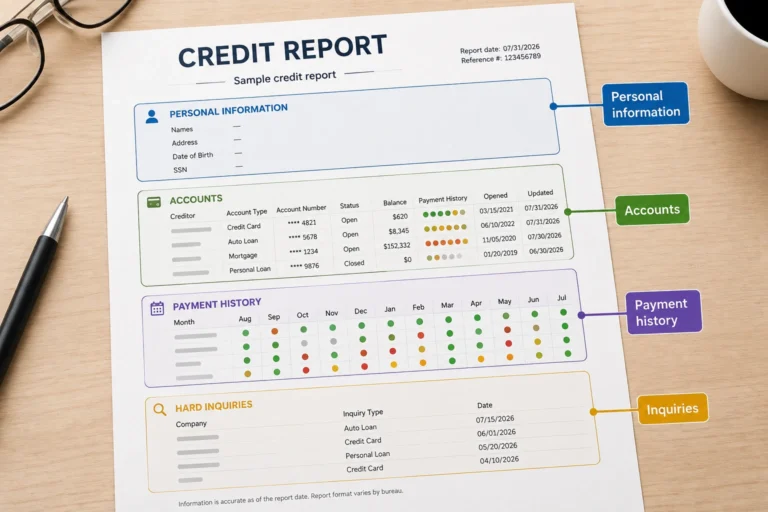
Start with the credit report connected to the score that changed. Compare an older copy with the most recent version and look for differences in reported balances, credit limits, payment history, hard inquiries, account statuses, collections, charge-offs, and personal information.
Why did my credit score go down when nothing changed?
If your credit score went down even though you did not open a new account, miss a payment, or make another obvious change, something may still have changed in the credit report used to calculate the score. Credit scores are based on reported information, and some changes can happen without you taking any new action.
For example, a credit card issuer may report a higher statement balance, reduce your credit limit, update an account status, or close an inactive account. A lender may report information that occurred earlier, you may be removed as an authorized user, or a collection or other account update may appear after a reporting delay. Any of these changes can alter the information used to calculate your score even if your financial behavior seems unchanged.
Also confirm that you are comparing the same credit bureau, scoring model, model version, and calculation date. If those match, compare the old and new credit reports line by line. Pay particular attention to reported balances, credit limits, account statuses, payment history, inquiries, authorized-user accounts, and recently updated information.
You can access your reports through AnnualCreditReport.com. If the account sections, status codes, and dates are unfamiliar, first learn how to read your credit report before comparing the old and new information.
| Credit report field | What to compare | What the change may show |
|---|---|---|
| Reported balance | Compare the previous balance with the most recently reported balance. | A higher reported balance may have increased your credit utilization. |
| Credit limit | Check whether a credit card limit was reduced. | A lower limit can increase utilization even if your balance did not change. |
| Payment status | Look for an account that changed from current to late or delinquent. | A newly reported late payment may explain the score change. |
| Account status | Check whether an account became closed, paid, transferred, or charged off. | An account-status change may affect the information used to calculate the score. |
| Date updated | Identify which accounts were updated shortly before the score changed. | A recent update can help narrow down what changed on your credit report. |
| Hard inquiries | Look for a new inquiry from a lender or credit card issuer. | A recent credit application may have added a hard inquiry. |
| New accounts | Check for a newly opened loan, credit card, or financing account. | A new account can change the age and composition of your credit profile. |
| Collections and charge-offs | Look for a newly added account or a material change to an existing one. | New negative information may affect the score based on the complete credit profile. |
| Account ownership | Check whether you are listed as an individual owner, joint owner, or authorized user. | Being added to or removed from an account can change the information in your file. |
| Account details | Compare balances, limits, payment dates, opening dates, and account numbers. | Incorrect information may indicate a credit reporting error. |
| Duplicate information | Check whether the same account or debt appears more than once. | Duplicate reporting may require further verification. |
| Unfamiliar information | Look for an account, inquiry, address, or name you do not recognize. | Unknown information may be a reporting error or a sign of identity theft. |
Do not assume that the most noticeable update caused the entire credit score drop. More than one part of the report may have changed at the same time. After identifying the differences, review each change separately and take action only when you understand what was reported and whether it is accurate.
Seven report changes that can explain a sudden credit score drop
A credit score does not identify the exact reason it changed. To find out why your credit score suddenly dropped, compare the underlying information in your previous and current credit reports. More than one balance, account, inquiry, or payment status may have changed at the same time.
Review these seven credit report changes individually. Confirm the reported data before assuming that one event caused the entire score decrease.
1. Check for a higher reported balance or lower credit limit
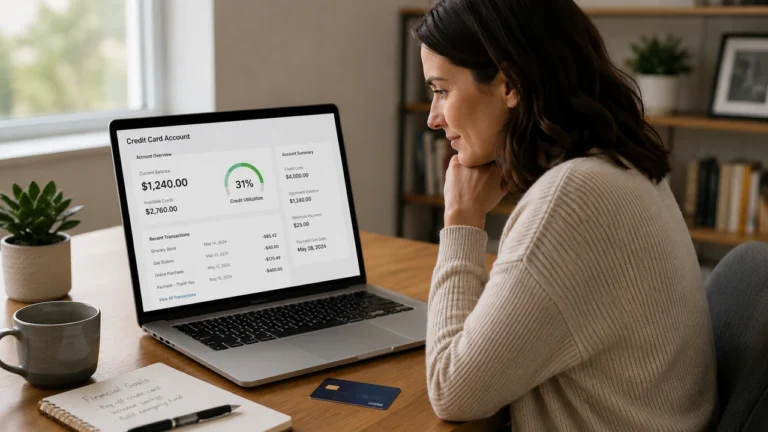
A higher reported credit card balance can increase your credit utilization and may help explain a sudden credit score drop. Credit utilization compares the balance reported for a revolving account with its credit limit.
The balance shown on your credit report may not match the current balance in your banking app. Credit card issuers generally report account information periodically, often using the balance from a recent billing statement. If the issuer reported your balance before a payment was reflected, your report may temporarily show a higher balance.
Example: Your reported balance increased
| Reported information | Previous report | Current report |
|---|---|---|
| Credit limit | $5,000 | $5,000 |
| Reported balance | $500 | $2,000 |
| Credit utilization | 10% | 40% |
In this example, the credit limit stayed the same, but the higher reported balance increased utilization. This can happen even if you later paid the card because the score was calculated using the report information available at that time.
Example: Your credit limit decreased
| Reported information | Previous report | Current report |
|---|---|---|
| Credit limit | $5,000 | $2,500 |
| Reported balance | $1,000 | $1,000 |
| Credit utilization | 20% | 40% |
Here, the reported balance did not change, but the lower credit limit doubled the account’s utilization. A credit limit decrease can change your credit profile even when you did not make additional purchases.
What to check
- Reported balance: Compare the newest balance with the amount shown on the previous report.
- Credit limit: Confirm whether the issuer reduced the limit.
- Date updated: Check when the issuer last reported the account.
- Statement closing date: Determine which balance may have been reported.
- Individual utilization: Review the balance-to-limit ratio for each revolving account.
- Overall utilization: Compare total revolving balances with total revolving credit limits.
2. Look for a new hard inquiry or credit account
A new hard inquiry on your credit report may help explain why your credit score dropped after applying for credit. A hard inquiry generally appears when a lender reviews your report in connection with an application for a credit card, loan, mortgage, auto financing, or another credit product.
A recently opened credit account can create a separate change. The application may add a hard inquiry, while the new account may affect the age and composition of your credit profile. The effect depends on the scoring model and the rest of the information in your report.
| What appeared | What it may mean | What to verify |
|---|---|---|
| New hard inquiry only | A lender reviewed your credit report after an application. | Confirm the company name and application date. |
| New inquiry and new account | The application resulted in a newly reported credit account. | Check the opening date, account type, credit limit, and reported balance. |
| Unrecognized hard inquiry | The lender may appear under a different business name, or the application may not be yours. | Contact the listed company and verify the reason for the inquiry. |
| Soft inquiry | The report was checked for credit monitoring, prequalification, or account review. | Confirm that the inquiry is classified as soft rather than hard. |
What to check
- Inquiry type: Confirm whether the entry is a hard inquiry or soft inquiry.
- Company name: Check whether the lender appears under a parent company or issuing bank.
- Inquiry date: Compare the date with recent credit applications.
- New account: Look for a credit card, loan, or financing account opened around the same time.
- Account details: Verify the opening date, credit limit, balance, and ownership status.
- Authorization: Confirm that you applied for or approved the credit check.
Checking your own credit report or score is a soft inquiry and does not lower your score. If you do not recognize a hard inquiry or new account, verify the company and account information before assuming the entry is accurate.
3. Check whether a late payment was reported
A newly reported late payment may help explain why your credit score dropped even though you paid on time. Review the payment history for each account and look for a month marked 30, 60, or 90 days late, a new past-due balance, or an account status that changed from current to delinquent.
Do not rely only on a credit-monitoring alert. Compare the credit report with your billing statement, bank records, payment confirmation, due date, and the date the creditor credited the payment.
What to check in the payment history
- Account name: Confirm that the late payment belongs to one of your accounts.
- Reported month: Identify the month marked late or delinquent.
- Delinquency level: Check whether the account is reported as 30, 60, or 90 days late.
- Amount past due: Compare the reported amount with your account statements.
- Payment due date: Verify when the payment was required.
- Payment date: Confirm when you submitted the payment.
- Credited date: Check when the creditor applied the payment.
- Date updated: Determine when the creditor last reported the account.
| What you found | What to verify | What to do next |
|---|---|---|
| The payment was actually late | Confirm the amount due, delinquency level, and current status. | Bring the account current if possible and verify later updates. |
| The payment was made on time | Compare the due date with bank records, statements, and payment confirmations. | Gather supporting documents and dispute the inaccurate late payment. |
| The report shows the wrong delinquency level | Check whether the account was actually 30, 60, or 90 days past due. | Dispute the specific status if it is inaccurate. |
| You do not recognize the account | Verify the creditor, account number, ownership, and personal information. | Check for a reporting error or possible identity theft. |
If your records show that the payment was made on time or the delinquency status is incorrect, follow the steps for how to dispute an inaccurate late payment. Focus the dispute on the specific month, status, or account detail that is wrong.
Do not dispute an accurate late payment simply because it affected your credit score.
4. Check whether an account was closed or changed
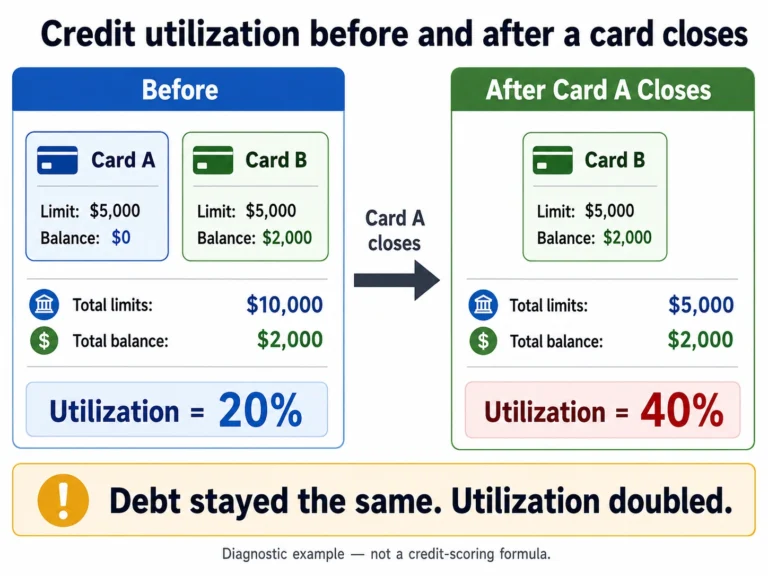
A closed account, lower credit limit, or change in account ownership may help explain a credit score drop. These updates can change the information in your credit report even when you did not miss a payment or increase your spending.
Review each account for a new closed status, reduced credit limit, ownership change, or new servicer name. An issuer may close an inactive credit card, reduce a credit limit, or remove an authorized user. A loan may also be transferred and reported under a different company name.
| What changed | How it may affect your credit profile | What to verify |
|---|---|---|
| A credit card was closed | Your total available revolving credit may decrease, which can increase utilization. | Check the balance, limit, closure date, and who closed the account. |
| A credit limit was reduced | The account’s utilization may increase even if the balance stayed the same. | Compare the previous and current limits. |
| You were removed as an authorized user | The account may no longer contribute the same information to your credit file. | Check your ownership status and whether the account still appears. |
| An account was transferred | The creditor or servicer name may change, and a new entry may appear. | Compare the balance, status, dates, and account number. |
| The open or closed status is incorrect | The report may contain inaccurate account information. | Compare the entry with statements and closure records. |
What to check
- Account status: Confirm whether the account is reported as open, closed, paid, or transferred.
- Closed date: Check when the account was closed.
- Credit limit: Compare the previous and current limits.
- Reported balance: Make sure the balance and payment status are correct.
- Ownership status: Confirm whether you are an individual owner, joint owner, or authorized user.
- Creditor or servicer name: Verify whether the account was transferred.
- Bureau differences: Check whether the change appears on one report or all three.
5. Check whether you recently paid off debt
If your credit score dropped after paying off debt, check how the paid account was updated on your credit report. Paying off a loan or credit card can change the account balance, status, available credit, and composition of your credit profile.
| What changed | What it may mean | What to verify |
|---|---|---|
| An installment loan became paid and closed | The number and types of active accounts changed. | Confirm the $0 balance, paid status, and closing date. |
| A credit card was paid off and left open | The lower balance may reduce revolving utilization. | Check the balance, credit limit, and date updated. |
| A credit card was paid off and closed | Your available revolving credit may decrease. | Verify the closed status, remaining balances, and total available credit. |
| A paid account still shows a balance | The creditor may not have reported the payoff, or the information may be inaccurate. | Compare the report with your payoff confirmation and account statement. |
| The score changed after the payoff | Another report update may have occurred at the same time. | Compare all balances, inquiries, and account statuses. |
If the timing matches your payoff, learn why your credit score may drop after paying off debt and which account details to verify before taking further action.
6. Look for a new collection, charge-off, or account update
A new collection on your credit report, a recently reported charge-off, or a material update to an existing negative account may help explain why your credit score suddenly dropped. Compare the previous and current reports to identify exactly what appeared or changed.
A charge-off and a collection are not the same. The original creditor may report a seriously delinquent account as charged off, while a collection agency may separately report that it is collecting the debt.
| What appeared or changed | What it may mean | What to verify |
|---|---|---|
| A new collection account appeared | A past-due debt may have been assigned or sold to a collection agency. | Confirm the original creditor, collector, balance, ownership, and reporting dates. |
| An account changed to charged off | The original creditor updated the status of a seriously delinquent account. | Check the payment history, balance, status, and delinquency dates. |
| A different collection agency appeared | The debt may have been transferred or sold. | Compare the creditor, partial account number, balance, and dates. |
| A paid collection still shows a balance | The payment may not have been reported, or the balance may be inaccurate. | Compare the report with payment or settlement records. |
| The same debt appears more than once | The debt may be duplicated or reported under different company names. | Compare account numbers, balances, statuses, ownership, and delinquency dates. |
| An unfamiliar collection appeared | The company name may be unfamiliar, or the debt may not belong to you. | Contact the company and verify the account before making a payment. |
| An existing negative account was updated | The creditor or collector may have changed the balance, status, or ownership information. | Compare each field with the previous report. |
What to check
- Original creditor: Identify the company connected to the original account.
- Collection agency: Confirm which company currently claims to collect the debt.
- Account ownership: Make sure the account belongs to you.
- Account status: Check whether it is unpaid, paid, settled, closed, transferred, or charged off.
- Current balance: Compare the amount with statements or settlement records.
- Date of first delinquency: Verify the delinquency date connected to the negative account.
- Date updated: Identify what changed when the account was last reported.
- Duplicate information: Compare similar entries before concluding that the debt is duplicated.
If both the original creditor and a collection agency appear, review the difference between a charge-off and a collection before deciding whether the debt is being reported incorrectly.
Do not assume that a recent update date means the collection or charge-off is new. The update may reflect a changed balance, payment status, ownership transfer, dispute result, or another account detail.
7. Check for inaccurate or unfamiliar information
Inaccurate information on your credit report may help explain why your credit score dropped when nothing seemed to change. Review every account, inquiry, balance, payment status, account date, and personal-information section for details that are incorrect, incomplete, duplicated, or unfamiliar.
An unfamiliar account does not automatically prove identity theft. A creditor may appear under the name of a parent company, issuing bank, collection agency, debt buyer, or new loan servicer. Verify the company and account details before deciding whether the information belongs to you.
| What you found | What it may mean | What to do next |
|---|---|---|
| A recognized account has incorrect details | The balance, limit, payment status, ownership, or account dates may be inaccurate. | Compare the entry with statements, payment records, and creditor correspondence. |
| An account appears to belong to someone else | Your credit file may contain information belonging to another consumer. | Check the name, address, partial account number, ownership, and creditor information. |
| You do not recognize an account or hard inquiry | The company name may be unfamiliar, or someone may have used your information. | Contact the company and verify the application, inquiry, or account. |
| Previously corrected information appeared again | The furnisher may have reported the information again, or the item may have been reinserted. | Compare the new entry with your earlier dispute results. |
| The same debt appears multiple times | The account may be duplicated or reported under different company names. | Compare account numbers, balances, ownership, statuses, and delinquency dates. |
| A paid account still shows a balance | The payment may not have been reported, or the balance may be inaccurate. | Compare the entry with payoff records, statements, and the date updated. |
| The negative information is accurate | The item may affect your score without being a credit reporting error. | Do not dispute accurate information solely because it lowered your score. |
What to verify before filing a dispute
- Company name: Identify the creditor, lender, collector, debt buyer, or servicer.
- Partial account number: Compare the number with your records.
- Account ownership: Confirm whether you are an individual owner, joint owner, cosigner, or authorized user.
- Reported balance: Compare the amount with statements, payoff confirmations, or settlement documents.
- Credit limit: Verify that the reported limit is accurate.
- Payment status: Check whether the account is current, late, charged off, paid, settled, closed, or transferred.
- Account dates: Compare the opening date, closing date, date updated, and date of first delinquency.
- Payment history: Identify the specific month or delinquency status that appears incorrect.
- Bureau reports: Determine whether the same error appears with Experian, Equifax, TransUnion, or more than one bureau.
- Supporting records: Gather documents that support your position.
If the information is inaccurate, incomplete, duplicated, or does not belong to you, follow the steps for how to dispute errors on your credit report. Identify the exact account detail that is wrong instead of disputing the credit score itself.
If an unfamiliar account or inquiry appears to involve unauthorized use of your personal information, contact the company’s fraud department, review all three credit reports, and use the official recovery process at IdentityTheft.gov.
Final check: More than one credit report change may occur at the same time. Identify the specific balance, status, inquiry, account, or reporting detail that changed before deciding what caused the score drop.
Does the number of points lost reveal the cause?
The number of points lost cannot reliably identify what caused your credit score to drop. A 10-, 20-, 30-, 50-, 60-, 80-, 100-, or even 200-point difference does not correspond to one specific credit event.
The same report change can affect two consumers differently because credit scores are calculated from the complete credit profile. Starting balances, credit limits, payment history, account age, negative information, scoring model, credit bureau, and calculation date can all influence the result.
My credit score dropped 30 points for no reason
If you are thinking, “my credit score dropped 30 points for no reason,” the 30-point decrease itself does not reveal what caused the change. First, confirm that you are comparing the same credit bureau, scoring model, model version, and calculation date. If those match, compare the underlying credit reports to identify what changed.
Look for a higher reported credit card balance, a reduced credit limit, a new hard inquiry, a recently opened or closed account, a newly reported late payment, an account-status change, a collection or charge-off update, or inaccurate or unfamiliar information.
A 30-point drop does not automatically mean that a serious negative item was added to your credit report. Even a change that appears minor can affect consumers differently depending on the rest of their credit profile.
My credit score dropped 60 points for no reason
If you are wondering, “why did my credit score drop 60 points for no reason?”, the 60-point decrease alone cannot tell you what caused it. First, make sure you are comparing scores from the same credit bureau, scoring model, model version, and calculation date. If those details match, compare your previous and current credit reports to find the information that changed.
A credit score can drop 60 points after one or several report updates, such as a higher reported credit card balance, a lower credit limit, a new hard inquiry, a newly opened or closed account, a reported late payment, a collection or charge-off update, or inaccurate information. More than one change may also have occurred at the same time.
A 60-point drop may feel significant, but it does not automatically prove that a specific serious negative item was added to your credit report. The same credit event can affect consumers differently depending on their overall credit profile and the scoring model being used.
My credit score dropped 80 points for no reason
If you are asking, “why did my credit score drop 80 points for no reason?”, the 80-point decrease by itself does not reveal what caused the change. First, confirm that you are comparing the same credit bureau, scoring model, model version, and calculation date. If those details match, compare your previous and current credit reports to identify what changed.
A credit score can drop 80 points after one or several credit report updates. Possible changes include a substantially higher reported credit card balance, a reduced credit limit, a newly reported late payment, a new hard inquiry or account, a closed account, a collection or charge-off update, or inaccurate or unfamiliar information.
More than one change can occur at the same time. For example, a higher reported balance and a lower credit limit could increase credit utilization while another account is also being updated.
An 80-point drop does not automatically prove that a late payment, collection, charge-off, or other serious negative item was added to your credit report. Credit scoring results depend on the complete credit profile, so the same report change can affect different consumers differently.
| Score change | What it tells you | What to check |
|---|---|---|
| 10 points | A small score change occurred, but the amount does not identify the cause. | Confirm the score source, calculation date, reported balances, credit limits, and recent inquiries. |
| 20 points | One or more credit report updates may have affected the score. | Review balances, new accounts, account statuses, payment history, and credit utilization. |
| 50 points | The change deserves investigation, but it does not prove that a specific negative event occurred. | Compare your previous and current credit reports line by line. |
| 80 points | A substantial score change occurred, but the number of points lost does not identify the specific cause. | Verify the score source, bureau, scoring model, version, and date, then review balances, limits, payment history, inquiries, account statuses, collections, charge-offs, and unfamiliar information. |
| 100 points | A substantial difference may involve multiple report changes or scores from different sources. | Verify the credit bureau, scoring model, model version, calculation date, and negative information. |
| 200 points | The number alone still cannot diagnose the cause. | Confirm that you are comparing the same type of score and inspect every section of the underlying credit report. |
Why the same change can produce different results
Two consumers can have the same increase in a reported credit card balance and experience different score changes. One may have several accounts, low overall utilization, and a long payment history, while the other may have a thin credit file, higher utilization, or recent negative information.
A score shown by a credit-monitoring app may also differ from a score used by a lender even when no reporting error occurred. The scores may use different credit bureaus, scoring models, model versions, or calculation dates.
What to compare instead of the point loss
- Credit bureau: Confirm whether both scores used Experian, Equifax, or TransUnion data.
- Scoring model: Check whether both scores were FICO Scores, VantageScores, or another score type.
- Model version: Determine whether the same version was used for both calculations.
- Calculation date: Confirm that the scores were generated from reports available on comparable dates.
- Reported balances and limits: Look for changes in credit utilization.
- Payment history: Check for newly reported late payments or delinquent statuses.
- Inquiries and new accounts: Review recent credit applications and account openings.
- Account statuses: Look for closed, paid, transferred, charged-off, or collection accounts.
- Errors or unfamiliar information: Verify any entry that appears inaccurate, duplicated, or unrelated to you.
What if your credit score dropped but there were no changes on your report?
If your credit score dropped but no changes appear on your credit report, first confirm that the score and report came from the same credit bureau and date. You may be comparing different scoring models, model versions, report snapshots, or types of credit scores.
A credit-monitoring alert is not a complete explanation of why a score changed. The service may not send an alert for every balance, credit limit, account status, or other report update. Review the complete credit report instead of relying only on the app’s summary.
| What you see | Possible explanation | What to check |
|---|---|---|
| Your score changed, but the app shows no alert | The monitoring service may not alert you to every relevant report update. | Review the complete report, including balances, limits, payment history, inquiries, and account statuses. |
| Your app score differs from a lender’s score | The scores may use different bureaus, scoring models, model versions, or industry-specific formulas. | Compare the score disclosures provided by the app and lender. |
| One credit report appears unchanged | The new information may appear only with another credit bureau or may have been reported at a different time. | Review your Experian, Equifax, and TransUnion reports. |
| The credit report is older than the score | The score may have been calculated from a newer report snapshot. | Compare the report date with the date the score was generated. |
| There is no new account or late payment | A less obvious balance, limit, ownership, past-due amount, or account-status change may have occurred. | Compare every field in the previous and current reports. |
| The reports appear identical | The scores may not be directly comparable, or the age of existing credit information may have changed. | Verify the bureau, scoring model, version, calculation date, and score type. |
Check whether you are comparing the same score
- Credit bureau: Confirm whether both scores used Experian, Equifax, or TransUnion data.
- Scoring model: Check whether both were FICO Scores, VantageScores, or another score type.
- Model version: Verify that the same version was used for both calculations.
- Score purpose: Determine whether one is a general-purpose score and the other is designed for mortgage, auto, or credit card lending.
- Calculation date: Compare the dates on which the scores were generated.
Look for changes that are easy to miss
- a different reported credit card balance;
- a reduced credit limit;
- a changed account ownership or authorized-user status;
- a new amount past due;
- a recently closed or transferred account;
- a changed collection or charge-off balance;
- a hard inquiry shown on only one bureau’s report;
- an account update that did not trigger a monitoring alert.
You can obtain your credit reports through AnnualCreditReport.com. Compare reports from the bureau connected to the score that changed, then check the other bureaus for information that may not appear in the first report.
What to do after you identify the cause
Once you identify what changed, respond to the underlying credit report information rather than trying to reverse the credit score directly. The correct next step depends on whether the information is accurate, inaccurate, unfamiliar, or related to possible identity theft.
| What caused the change | What to do now | What not to do |
|---|---|---|
| A higher reported balance | Confirm the reporting date, statement balance, credit limit, and current balance. Consider reducing the balance if it fits your budget. | Do not assume that paying a specific amount will restore a specific number of points. |
| A lower credit limit | Confirm the new limit and recalculate your individual and overall credit utilization. | Do not open several new accounts solely to replace the lost available credit. |
| An authorized hard inquiry | Confirm the lender, application date, and any new account connected to the inquiry. | Do not dispute a hard inquiry that you authorized. |
| An unrecognized inquiry or account | Contact the listed company and verify the application, account ownership, and identifying information. | Do not ignore possible unauthorized activity or provide sensitive information to an unverified caller. |
| An accurate late payment | Bring the account current if possible, continue making on-time payments, and verify future account updates. | Do not file a false dispute simply because the late payment affected your score. |
| An inaccurate late payment | Gather statements, payment confirmations, and bank records, then dispute the specific month or delinquency status that is wrong. | Do not submit a vague dispute that fails to identify the inaccurate information. |
| A closed or changed account | Verify the account status, balance, credit limit, ownership, closing date, and servicer information. | Do not assume that reopening or replacing the account will restore the previous score. |
| A recently paid-off debt | Confirm that the account shows the correct $0 balance, paid status, and closing date. | Do not take on new debt solely to change your credit mix. |
| A collection or charge-off | Verify the original creditor, collector, account ownership, balance, status, and reporting dates. | Do not pay an unfamiliar account before confirming that the debt belongs to you. |
| An inaccurate credit report entry | Identify the exact error, gather supporting records, and dispute the information with the credit bureau and the company that furnished it. | Do not dispute the credit score itself or demand deletion without identifying an error. |
| Possible identity theft | Contact the company’s fraud department, review all three credit reports, and consider a fraud alert or credit freeze. | Do not wait for additional unfamiliar accounts to appear before investigating. |
Correct inaccurate credit report information
If the report contains inaccurate, incomplete, duplicated, or unfamiliar information, identify the specific account field that is wrong. Save a copy of the credit report and collect documents that support your position, such as statements, payment confirmations, payoff records, creditor letters, or identity-theft documents.
- Write down the creditor or collector name, partial account number, disputed information, and reporting date.
- Gather records that show what the information should say.
- Dispute the inaccurate information with each credit bureau reporting the error.
- Send the dispute to the lender, creditor, collector, or other company that furnished the information.
- Keep copies of your dispute, supporting documents, delivery confirmation, and investigation results.
- Review the updated credit report and confirm that the correct information appears.
Disputing an error does not guarantee that an account will be deleted or that your credit score will increase. The investigation must determine whether the reported information is accurate and verifiable.
Respond to accurate information
If the information is accurate, focus on the account condition that caused the change. Bring past-due accounts current when possible, continue making payments on time, review reported credit card balances, and avoid unnecessary credit applications while your credit profile stabilizes.
- For higher utilization: Monitor reported balances and credit limits rather than only the current balances in your banking app.
- For a late payment: Confirm that the account is current and prevent additional missed payments.
- For a closed account: Recalculate overall utilization and verify that the closed status is accurate.
- For a paid account: Make sure the balance and paid status are reported correctly.
- For a collection or charge-off: Verify the debt and reporting details before deciding how to address the account.
How to monitor your credit after the problem is addressed
After addressing the cause of a credit score drop, monitor the underlying credit report information before judging the result by the score alone. Confirm that the expected balance, credit limit, payment status, account status, or disputed information was updated correctly.
Credit report and score updates do not follow one universal schedule. A creditor may need time to send new information to the credit bureaus, and different bureaus may update the same account on different dates. Track the account’s reporting date and compare the same type of credit score instead of expecting an immediate increase.
| What you addressed | What to monitor | What confirms the update |
|---|---|---|
| A high reported balance | Reported balance, credit limit, date updated, and credit utilization | The new balance appears on the report connected to the score you are monitoring. |
| An incorrect late payment | Payment history, disputed month, delinquency level, and account status | The inaccurate late status is corrected or removed from the applicable report. |
| A paid-off account | Current balance, paid status, closing date, and payment history | The account shows a $0 balance and the correct paid or closed status. |
| A paid or settled collection | Collection balance, account status, and date updated | The balance and paid or settled status match the payment or settlement records. |
| A credit report error | The exact balance, date, status, ownership, or other field identified in the dispute | The corrected information appears on each report that previously contained the error. |
| Possible identity theft | Unauthorized accounts, hard inquiries, addresses, names, and collection entries | The fraudulent information is blocked, removed, or otherwise addressed through the appropriate process. |
| A closed or transferred account | Account status, ownership, balance, credit limit, creditor name, and servicer information | The report accurately reflects whether the account is open, closed, paid, or transferred. |
Record your starting information
Before checking for an update, save enough information to make a valid comparison. A score without its source and date does not show whether your credit profile is improving.
- Score source: Record the app, lender, bank, or monitoring service that provided the score.
- Credit bureau: Note whether the score used Experian, Equifax, or TransUnion data.
- Scoring model: Record whether it is a FICO Score, VantageScore, or another score type.
- Model version: Save the version when the provider identifies it.
- Calculation date: Record the date the score was generated.
- Account details: Save the reported balance, limit, status, payment history, and date updated.
- Supporting records: Keep payment confirmations, payoff statements, dispute letters, investigation results, and creditor correspondence.
Compare the same credit score
To monitor your credit after a score drop, compare scores that use the same bureau, scoring model, model version, source, and purpose whenever possible. A FICO Score based on Experian data is not directly comparable to a VantageScore based on TransUnion data.
A lender may also use a mortgage, auto, or credit card lending score that differs from the general-purpose score shown in a consumer app. A different result does not automatically mean that your credit report contains an error.
Check the report before checking the score
If your credit score has not updated after a payment, dispute, or account correction, review the credit report connected to that score. The account information may not have been reported yet, or the score may have been calculated before the new data appeared.
- Check the account’s most recent date updated.
- Confirm that the expected balance, status, or correction appears.
- Review the same account with the other credit bureaus when necessary.
- Compare a new score only after the underlying report information changes.
- Keep your records until the payment, dispute, or account update is fully resolved.
You can review your credit reports through AnnualCreditReport.com. Check all three reports when an error, unfamiliar account, or identity-theft concern may affect more than one credit bureau.
Measure progress without reacting to every fluctuation
One score increase does not necessarily prove lasting improvement, and one decrease does not automatically mean that a new problem occurred. Focus on whether accurate information is being reported consistently and whether the condition that caused the original score drop has been addressed.
To separate meaningful progress from normal score fluctuations, learn how to know if your credit score is improving by tracking the same score source and the credit report information behind it.
Frequently asked questions
Why did my credit score drop for no reason?
A credit score usually changes because the underlying credit report data, score source, or calculation date changed. Compare the same bureau, scoring model, model version, and report date, then check reported balances, credit limits, inquiries, payment history, account statuses, collections, and unfamiliar information.
Why did my credit score drop even though I paid on time?
Payment history is only one part of a credit score. Your score may change because of higher reported credit card balances, lower credit limits, new inquiries, recently opened or closed accounts, collection updates, or differences between the scores being compared.
Also review your payment history to make sure an inaccurate late payment was not reported.
Why did my credit score drop overnight?
A credit score can appear to drop overnight after a lender, creditor, or collection agency updates information with a credit bureau. The underlying event may have happened earlier, but the score changed only after the new information appeared in the report and the score was recalculated.
Can my credit score drop without a new account or late payment?
Yes. A credit score may drop without a new account or late payment if a reported balance increased, a credit limit decreased, an account closed, you were removed as an authorized user, a collection or charge-off was updated, or you compared scores from different sources.
Does checking my own credit score lower it?
Checking your own credit score or credit report is generally treated as a soft inquiry and does not lower your score. A hard inquiry may appear when a lender reviews your credit in connection with an application for a credit card, loan, mortgage, auto financing, or another credit product.
How long does it take for a credit score to update after a payment?
There is no universal update schedule. The creditor must first report the new balance or account status to the applicable credit bureau, and the score must then be recalculated using the updated report data.
Check the account’s reported balance, status, and date updated before expecting the score to reflect the payment.
Should I dispute a credit score drop?
You do not dispute the credit score itself. File a dispute only when you identify specific credit report information that is inaccurate, incomplete, duplicated, or unrelated to you.
Do not dispute accurate negative information solely because it lowered your score. Instead, address the underlying account and continue monitoring future report updates.
Final takeaway
If you are asking, “Why did my credit score drop for no reason?” start by confirming that you are comparing the same credit bureau, scoring model, model version, and calculation date. Then compare the underlying credit reports to identify what actually changed.
- Confirm the score source: Make sure the old and new scores are directly comparable.
- Compare the credit reports: Review reported balances, credit limits, inquiries, payment history, account statuses, collections, charge-offs, and unfamiliar information.
- Address the specific change: Correct inaccurate information or respond appropriately to accurate account updates.
The number of points lost cannot reliably reveal the cause. Focus on the balance, status, inquiry, account, or reporting detail that changed instead of trying to dispute or repair the score itself.