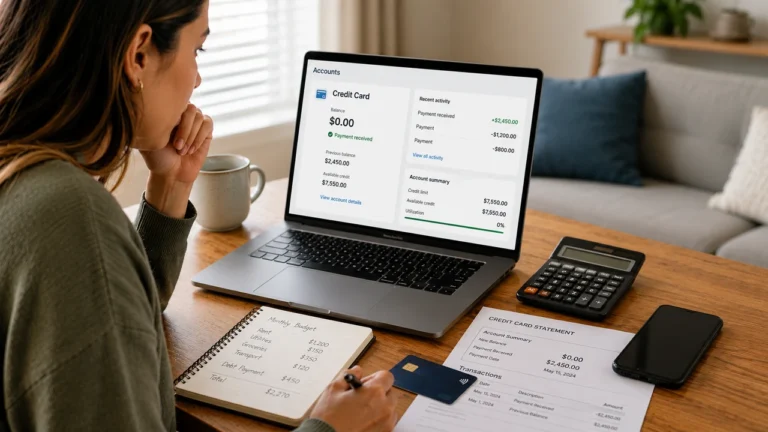
How to fix your credit score after paying off debt

Credit score
How to fix your credit score after paying off debt starts with checking whether the payoff was reported correctly on your credit reports. If the account still shows an old balance or incorrect status, compare the payoff date with the account’s date updated to determine whether you are seeing a reporting delay or a factual error.If the payoff is already reported correctly but your credit score is still low, look at the rest of your credit profile. Remaining credit card utilization, older negative information, an account closure, a reduced credit limit, or another recent change may still be affecting your score. The steps below will help you identify which problem applies and what to do next.
Contents

Which situation matches yours?

Your situation What to check What to do next
The old balance is still showing after you paid the debt. Check the reported balance and the account’s date updated. Compare that date with the date your payoff was processed. If the report was last updated before the payoff, the new information may not have been reported yet. Continue to what to do when the payoff has not updated.
The payoff appears, but the balance or account status is wrong. Compare the account across Equifax, Experian, and TransUnion. Check the balance, account status, payment history, credit limit if applicable, and date updated. If the information is actually inaccurate, continue to the reporting error check before deciding whether a dispute is appropriate.
The account is reported correctly, but your credit score did not improve. Check your remaining revolving balances, other negative information, recent account changes, and whether you are comparing the same type of credit score over time. Continue to the Three-Bureau After-Payoff Credit Report Audit to identify what may still be holding your score back.
Your credit score actually dropped after you paid the debt. Check whether an account closed, your available revolving credit changed, or another item appeared or changed on your credit reports around the same time. Use the separate guide on why your credit score dropped after paying off debt.

Do not apply for new credit or dispute an account simply because your score did not increase. First determine whether you are dealing with an update delay, inaccurate reporting, or another part of your credit profile that is still affecting the score.

Run the Three-Bureau After-Payoff Credit Report Audit

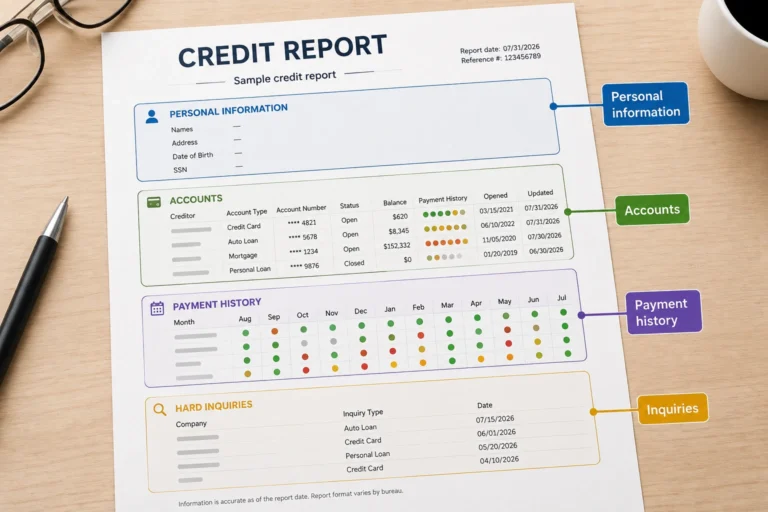
If you’re checking your credit report after paying off debt, compare the account on your Equifax, Experian, and TransUnion reports before trying another credit-building strategy. Look at the reported balance, account status, date updated, payment history, and credit limit when applicable. This will help you determine whether the payoff simply has not been reported yet, whether something appears inaccurate, or whether the account is already correct and another factor is keeping your credit score low.

Three-bureau credit report audit comparing Equifax, Experian, and TransUnion after paying off debt

You can get your credit reports through AnnualCreditReport.com. If you are not sure where to find the balance, account status, payment history, or reporting dates, see our guide on how to read your credit report before completing the audit.

Step 1: Find the account you paid

Open the same account on each credit report and compare the actual account details rather than looking only at the creditor’s name. A paid account may appear differently across reports if the information was updated at different times, so a difference by itself does not prove that a report is wrong.

  • Current balance: Does the reported amount match what you actually owe after the payoff?
  • Account status: Does the account accurately show whether it is open, closed, paid, settled, current, in collection, or charged off, as applicable?
  • Date updated: When was the account information last updated on each report?
  • Payment history: Are any late payments shown that you believe did not occur?
  • Credit limit: If the account is an open credit card or other revolving account, is the reported limit correct?
  • Duplicate reporting: Does the same debt appear more than once in a way that may be inaccurate?

Step 2: Compare Equifax, Experian, and TransUnion

Record what each report shows in the worksheet below. Pay particular attention to the balance and date updated. For example, if Experian shows a $0 balance but TransUnion still shows $1,200, compare the update dates before assuming the TransUnion entry is inaccurate.

What to check Equifax Experian TransUnion
Current balance ________ ________ ________
Account status ________ ________ ________
Date updated ________ ________ ________
Payment history correct? Yes / No Yes / No Yes / No
Credit limit correct? Yes / No / N/A Yes / No / N/A Yes / No / N/A
Payoff reflected? Yes / No Yes / No Yes / No
Possible duplicate? Yes / No Yes / No Yes / No

Step 3: Match Your Audit Result to the Next Step

What you found What it may mean What to do next
The old balance still appears on all three reports. The payoff may not have reached the credit reports yet, or the reported balance may need further investigation. Compare the payment date with each report’s date updated, then continue to what to do if the payoff has not updated.
One bureau shows the payoff, but another still shows the old balance. The bureaus currently have different versions of the account information. That does not automatically mean the older report contains an error. Compare the dates updated and determine which report contains the more recent account information before taking further action.
The balance, status, payment history, or credit limit appears factually wrong. You may be dealing with inaccurate credit-report information rather than a credit-scoring problem. Save the documents that support the correct information and continue to the reporting error check.
All three reports show the payoff correctly, but your credit score is still low or unchanged. The payoff reporting itself is less likely to be the main problem. Remaining utilization, other negative information, an account closure, or another recent credit change may still be affecting your score. Continue to what to check when the payoff is correct but your score did not improve.
Your credit score dropped after the payoff. A score decrease is a separate troubleshooting path because the payoff may have coincided with an account closure, utilization change, or another change in your credit file. Follow the dedicated score-drop path identified in the quick diagnostic above.

Do not dispute an account just because the three credit reports are different. First identify the specific balance, status, payment-history entry, credit limit, ownership information, or duplicate listing that you believe is inaccurate. If the account information is correct across your reports, move on to the other factors that may still be affecting your credit score.

What to Do If the Payoff Has Not Updated Yet

If your credit report still shows the balance or account status from before you paid the debt, first compare the payoff date with the account’s reported date updated. A report that was last updated before your payment may simply contain older information.

1. Confirm That the Payment Cleared

Check your bank record, payoff confirmation, final statement, or settlement confirmation to make sure the payment was completed and applied to the correct account.

2. Compare the Payoff Date With the Date Updated

Find the account’s most recent update date on each credit report. If the report was last updated before the payoff, the old balance does not automatically mean the information is inaccurate.

3. Check All Three Credit Reports

Compare Equifax, Experian, and TransUnion. One report may show the payoff before another because the reports may contain account information from different update dates.

4. Contact the Lender or Collector if Needed

If the payoff still has not appeared, contact the lender, creditor, or collector and ask whether the payment has been reported and when the account information was last sent to the credit bureaus. Keep a record of the response.

5. Investigate if Newer Reporting Is Still Wrong

If the account has a newer update date but still shows a balance you do not owe, an incorrect account status, or another factual discrepancy, compare the report with your payoff records and continue to the reporting error check.

Do not dispute the account solely because the payoff has not appeared yet. First determine whether you are looking at information that predates the payment or information that was updated after the payoff but is still factually incorrect.

What Should Your Credit Report Show After Paying Off Debt?

After paying off debt, your credit report should reflect the account accurately once the creditor or collector reports the updated information. What you should expect depends on the type of account you paid, so check the balance, status, dates, and other account details instead of assuming a paid account should disappear.
Example of a paid-off account correctly reported with a zero balance

Compare Your Account With What You Should Expect

Account you paid What to check What may be normal after payoff What deserves a closer look
Credit card Reported balance, open or closed status, credit limit, payment history, and date updated. If you paid the balance to $0 and made no new charges, the updated report may show a $0 balance while the card remains open. An old balance remains after newer information is reported, the credit limit is incorrect, the payment history is wrong, or the account is shown as closed when it is actually open.
Personal, auto, or student loan Reported balance, paid or closed status, payment history, and date updated. A fully paid installment loan generally shows a $0 balance and a paid or closed status after the payoff is reported. The report shows an amount you no longer owe, an inaccurate current delinquency, or payment-history information that does not match your records.
Collection account Reported balance, paid or settled status, account ownership, dates, and possible duplicate reporting. A paid or settled collection may remain on your credit report while showing the correct updated balance and status. Payment does not automatically require an accurate collection to be deleted. The balance is incorrect, the debt does not belong to you, the status does not reflect what happened, the dates appear inaccurate, or the same debt is improperly reported more than once.
Charge-off Reported balance, account status, payment history, dates, and any amount still shown as owed. Paying a charge-off may update the balance without removing the earlier charge-off history. The report shows an amount you do not owe, an inaccurate current status, incorrect payment history, or dates that do not match your records.

A paid account can remain on your credit report. What matters is whether the information being reported is accurate. Paying a collection, charge-off, or account with earlier late payments does not automatically make the accurate negative history incorrect or require it to disappear.

For example, suppose you paid a collection in full and the account now shows a $0 balance with an updated paid status, but the collection is still listed. The fact that it remains on the report does not by itself mean there is an error. Compare the balance, status, ownership, dates, and payment information with your records before deciding that something needs to be corrected.

Three Signs the Account Needs a Closer Look

  1. The balance is incorrect. Your payoff confirmation or final statement shows a different amount from the balance currently reported.
  2. The account status does not match what happened. For example, a fully paid loan still appears currently delinquent or an open credit card is incorrectly reported as closed.
  3. Another account detail appears inaccurate. This may include payment history, a credit limit, ownership information, dates, or a duplicate entry that does not match your records.

If something looks wrong, compare the report with your payoff confirmation, final statement, payment record, and the account’s date updated before treating it as a reporting error. If the information is factually inaccurate, continue to the reporting error check. If the account information appears accurate but the payoff itself has not been reflected yet, continue to what to do when the payoff has not updated.

If your credit score is not improving after paying off debt even though the payoff is reported correctly, the payoff itself is probably no longer the main issue. Check the rest of your credit profile for high revolving utilization, accurate negative information, a recently closed installment loan, another credit-report change, or differences between the credit scores you are comparing.

1. Check Your Remaining Credit Card Utilization

Credit utilization example after paying off one credit card

Paying one account to $0 may help, but another credit card can still report a high balance relative to its limit. Check both your total revolving balances and each card separately rather than looking only at the account you paid off.

For example, suppose you paid Card A from a $1,500 balance to $0 on a $3,000 limit, but Card B still reports a $4,500 balance on a $5,000 limit. Card B is using 90% of its individual limit, so high utilization may still be an important factor even though Card A is now paid off.

If your remaining card balances may be part of the problem, see how credit utilization affects your credit score and calculate both your overall and per-card utilization.

2. Look for Accurate Negative Information That Is Still Being Reported

Review your reports for earlier late payments, collections, charge-offs, or other negative information that remains accurate. Paying off one debt does not automatically remove accurate negative history from your credit reports.

If the balance and status are correct, do not dispute the account simply because the negative history is still affecting your credit profile. Instead, identify each remaining issue separately and use the appropriate recovery strategy for that specific problem.

3. Check Whether Paying Off the Debt Closed an Installment Loan

If you paid off a personal loan, auto loan, student loan, mortgage, or another installment account, check whether it is now reported as paid and closed. If it was your only active installment loan, the structure of your credit profile changed when the account closed.

Some FICO score profiles can lose points after the last active installment loan is paid off, even though paying off the debt was financially responsible. Do not take out another loan solely to try to replace the closed account or manipulate your credit mix.

4. Look for Another Change That Happened Around the Same Time

A debt payoff may not be the only recent change on your credit reports. Check for a higher credit card balance, reduced credit limit, new hard inquiry, newly opened account, account closure, late payment, or collection that appeared around the same time.

If you saved an earlier copy of your credit reports, compare it with the current version. A payoff may have improved one part of your credit profile while another change worked in the opposite direction.

5. Make Sure You Are Comparing the Same Type of Credit Score

Check where each score came from, which credit bureau supplied the underlying report data, the scoring model if it is shown, and the date the score was calculated. Consumers can have multiple credit scores, and scores calculated from different bureau data or scoring models do not always move in the same way.

When possible, compare the same type of score from the same source over time. If the payoff is reported correctly and the underlying credit-report information is improving, a different score from another source should not automatically be treated as evidence that the payoff failed.

Use This Quick Check to Choose Your Next Move

What you found What to focus on next
Another card still has high utilization Review your remaining revolving balances and limits.
Accurate late payments, collections, or charge-offs remain Address the remaining negative issue without disputing accurate information.
Your final active installment loan closed Keep your other accounts in good standing rather than borrowing again solely for credit mix.
Another negative change appeared around the payoff Investigate that new change instead of assuming the payoff caused the entire score result.
You were comparing different credit scores Track the same score source and underlying credit-report data over time when possible.

If your reports are accurate, focus on the strongest remaining problem rather than applying for unnecessary new credit, carrying a balance to build credit, or filing disputes against information that is correct.

What Should You Do After Paying Off a Credit Card?

After paying off a credit card, check that the new balance is reflected on your credit reports, confirm whether the account is still open, and verify that the reported credit limit is correct. Do not automatically close the card just because you paid it off; first consider the annual fee, your spending habits, and how losing that credit limit could affect your overall credit utilization.

Confirm the Balance, Status, and Credit Limit

Find the card on your credit reports and check the reported balance, account status, credit limit, payment history, and date updated. If you paid the card to $0 and have not made new purchases or incurred legitimate interest or fees, the reported balance should eventually reflect the lower amount after the issuer sends updated account information.

If the card still shows an older balance, compare the report’s date updated with your payment date before assuming something is wrong. If the balance has updated but the card unexpectedly shows as closed or the credit limit does not match your account records, note the specific discrepancy for further review.

Check Your Credit Utilization After the Payoff

Paying off a credit card can reduce revolving utilization when the lower balance is reported, but you should look at your other cards as well. Check both your overall utilization and the percentage of each individual card’s limit that is being used.

For example, suppose you have two cards. Card A has a $0 balance and a $5,000 limit, while Card B has a $2,000 balance and a $5,000 limit. Your total reported balances are $2,000 against $10,000 in total limits, or 20% overall utilization.

If Card A closes and its $5,000 limit is no longer available, the same $2,000 balance on Card B would represent 40% overall utilization. That is why the open or closed status of a paid-off card can matter when you still have balances elsewhere.

Should You Close a Credit Card After Paying It Off?

Your situation What to consider Possible next step
The card has no annual fee and you can manage it responsibly. Keeping the account open may preserve available revolving credit and avoid increasing utilization solely because the credit limit disappears. Keeping the card open may make sense. Continue monitoring the account for charges, fees, and fraud.
The card charges an annual fee that no longer provides enough value. Compare the cost of keeping the card with the effect that losing its credit limit could have on your utilization. Ask whether a no-fee product change is available, or consider closing the account if keeping it no longer makes financial sense.
Keeping the card available makes overspending more likely. A possible credit-score benefit should not outweigh the risk of going back into debt you cannot comfortably repay. Closing the card may be the better financial decision even if your available credit decreases.
The issuer already closed the card. Check your remaining revolving limits and balances to see whether your overall utilization changed. Do not open another card or loan solely to replace the lost limit. First decide whether you actually need new credit.

You Do Not Need to Carry a Balance to Build Credit

Leaving part of your credit card balance unpaid from one billing cycle to the next is not necessary to build positive credit history. If you keep the card open, you can use it for purchases that fit your budget and pay the statement balance in full by the due date to avoid interest when the card’s terms provide a grace period.

Use This Quick Check After Paying Off the Card

  • Confirm the reported balance reflects the payoff.
  • Check whether the card is still open.
  • Verify the reported credit limit.
  • Review utilization across all of your remaining credit cards.
  • Decide whether keeping the card open still makes financial sense.
  • Avoid carrying a balance or opening new debt solely to try to influence your credit score.

If the card is reporting correctly and you have decided whether to keep it open based on cost, spending risk, and utilization, there may be nothing else to change on that account. The next step is to evaluate any other debts or credit-report factors that still need attention.

What Should You Do After Paying Off a Loan?

After paying off a loan, check that your credit reports show the correct balance, account status, payment history, and update date. A fully repaid installment loan will generally be reported with a $0 balance and a paid or closed status once the lender reports the payoff, so a closed account is not automatically a reporting problem.

Confirm the Loan Is Reported Correctly

Find the loan on your Equifax, Experian, and TransUnion reports and compare the account information with your final statement or payoff confirmation. Check the reported balance, account status, payment history, and date updated.

If the report still shows an old balance, compare the date updated with the date your final payment cleared. A report that was last updated before the payoff may simply contain older information. If newer information has already been reported but the balance or status is still factually wrong, save your records and continue to the reporting error check.

Know What a Paid-Off Loan Should Look Like

What your report shows What it may mean What to do next
$0 balance and paid or closed status The loan payoff appears to have been reported correctly. No correction is needed simply because the account is closed.
An old balance with an update date from before the payoff The report may still contain information from before your final payment. Continue to what to do when the payoff has not updated.
A balance you do not owe even though the account was updated after the payoff The reported balance may be inaccurate. Compare the entry with your final statement and payoff confirmation, then continue to the reporting error check if the numbers do not match.
A current late or delinquent status that does not match your records The payment status may be inaccurate. Identify the exact payment-history entry that is wrong and keep the records showing when your payments were made.
The loan is reported correctly, but your score is still lower than expected The loan entry itself may no longer be the issue. Return to the post-payoff credit score checks and review the rest of your credit profile.

Check Whether It Was Your Only Active Installment Loan

If this was your only active installment loan, paying it off changes the mix and structure of your active accounts. Some FICO score profiles can lose points after the last active installment loan closes, although the effect depends on the rest of the credit file and is not the same for every consumer.

Do not open another personal loan, auto loan, credit-builder loan, or other installment account solely to replace the loan you paid off. A new loan can add interest, fees, another monthly payment, and potentially a hard inquiry or new account without guaranteeing a better credit score.

Use This Post-Loan Payoff Check

  • Confirm that the balance is $0 if the loan was paid in full.
  • Confirm that the account is accurately reported as paid or closed.
  • Compare the date updated with your payoff date.
  • Check the payment history for any entry that does not match your records.
  • Determine whether this was your only active installment loan.
  • If the loan information is wrong, identify the exact field that needs correction.
  • If the loan information is correct, do not create new debt solely to replace the closed account.

If the loan is accurately reported as paid and closed, there may be nothing left to correct on that account. Focus on the other information in your credit reports rather than changing a correctly reported loan simply because you expected a different credit score result.

What If You Paid a Collection or Charge-Off?

If you paid a collection or charge-off, check whether the balance and account status now match what actually happened. Paying the debt can update the information on your credit reports, but it does not automatically require accurate negative history to disappear.

If You Paid a Collection

Check the collection’s current balance, paid or settled status, account ownership, dates, and whether the same debt appears more than once. If a collection was paid in full, or a collector accepted a payment that settled the entire debt, the credit reports should generally reflect a $0 balance once the updated information is reported.

If the collection shows the correct balance and status but is still listed on your report, its continued presence does not by itself mean the information is inaccurate. For the next steps specific to a correctly reported paid collection, see what happens to your credit score after paying off collections.

If You Paid a Charge-Off

Check the charge-off’s reported balance, account status, payment history, dates, and any amount still shown as owed. Paying or settling the balance may update the account without removing the historical charge-off itself.

If your records show that the amount owed was fully resolved but the account still reports a balance you do not owe, compare the entry with your payoff confirmation, settlement agreement, final statement, and payment record. If the charge-off is reporting accurately and you want to understand what the payment may mean for your credit profile, see what paying a charge-off can mean for your credit score.

Compare What You See With What Happened

Account What to verify What may be normal What needs a closer look
Collection Balance, paid or settled status, ownership, dates, and duplicate reporting. The collection remains on the report but accurately reflects the payment or settlement. The balance is wrong, the debt is not yours, the status is inaccurate, the dates do not match your records, or the same debt appears improperly more than once.
Charge-off Balance, account status, payment history, dates, and any amount still reported as owed. The historical charge-off remains even though the balance or status was updated after payment. The account reports money you no longer owe, an inaccurate current status, incorrect payment history, or dates that do not match your records.

Choose the Correct Next Step

If the information is accurate: do not dispute the collection or charge-off simply because it is still visible or still affects your credit profile. Use the collection- or charge-off-specific guide above to decide what to work on next.

If the information is factually wrong: identify the exact balance, status, ownership detail, date, payment-history entry, or duplicate listing that does not match your records. Then continue to the reporting error check before deciding whether a credit report dispute is appropriate.

Is This a Reporting Error or Accurate Negative Information?

If something looks wrong on your credit report after paying off debt, identify the exact information that is inaccurate before filing a dispute. A wrong balance, account status, payment-history entry, date, credit limit, ownership detail, or duplicate listing may need to be corrected, but accurate negative information does not become an error simply because the debt was paid or your credit score did not improve.

Use This Check Before You Dispute

What you see Possible error? What to check next
The account shows a balance you no longer owe. Possibly. Compare the reported balance and date updated with your payoff confirmation, final statement, settlement agreement if applicable, and payment record.
The account still shows unpaid or currently delinquent after the debt was resolved. Possibly. Compare the reported status and payment history with the creditor’s records and your proof of payment.
A late payment appears that did not occur. Possibly. Check the reported month against your statements, bank records, and payment confirmations. Identify the exact late-payment entry you believe is wrong.
The same debt appears more than once in a way that may be incorrect. Possibly. Compare the creditor or collector names, partial account numbers, balances, dates, and statuses before deciding the entries are improper duplicates.
The account or debt does not belong to you. Potentially. Check the creditor name, account number, opening date, balance, and ownership information. Save a copy of the report showing the unfamiliar account and investigate it promptly.
A paid collection or charge-off remains but the balance and status are accurate. Not automatically. Do not dispute it solely because the negative history is still visible. Accurate negative information generally does not become inaccurate because the debt was later paid.
A fully paid loan shows a $0 balance and paid or closed status. Usually not. A correctly reported closed installment loan does not need to be corrected simply because the account closed after payoff.
Everything appears accurate, but your credit score did not increase. No, not by itself. Return to the post-payoff credit score checks and look for another factor affecting your credit profile.

Example: Reporting Delay or Actual Error?

Timeline comparing debt payoff date with credit report update date

Suppose you paid a loan in full on August 5, but your credit report still shows a $780 balance and lists the account as last updated on July 31. That does not prove the balance is wrong because the report may still contain information from before the payoff.

If the account later shows an update dated August 20 but still reports a $780 balance even though your lender confirms that you owe $0, you now have a specific discrepancy to investigate: the reported current balance.

Save Evidence That Matches the Specific Problem

If you find a factual discrepancy, save the records that directly support the correction you are requesting. Depending on the problem, that may include a payoff confirmation, final statement, payment record, settlement agreement, account statement, or written communication from the creditor. Do not send unrelated documents simply because you have them; first identify exactly which reported field is wrong and what your records show instead.

If You Found a Specific Error, Dispute That Error

If your review identifies inaccurate or incomplete information, describe the specific item that is wrong and what the correct information should be. The CFPB recommends disputing inaccurate or incomplete information with both the credit reporting company and the company that furnished the information.

For the full process, including how to describe the problem and submit supporting records, follow our guide on how to dispute errors on your credit report.

If you did not find a factual error, do not manufacture one. A paid account can still contain accurate negative history, and a credit score that remains lower than you expected is not proof that your credit report is inaccurate. In that situation, focus on the remaining factors in your credit profile instead of disputing information that is correct.

Your After-Payoff Action Matrix

If you’re deciding what to do after paying off debt, use what you found in your credit reports to choose the next step. Do not make another credit move just because your score did not change the way you expected.

What you found What it may mean What to do now What to avoid
The paid account still shows an old balance, and the report was last updated before your payoff. The report may still contain information from before your final payment. Follow the payoff-not-updated steps and compare the payoff date with the reported update date. Do not dispute the account solely because the newer payoff information has not appeared yet.
The balance, status, payment history, ownership, or another account detail is factually wrong. You may have identified a reporting error. Use the reporting error check to identify the exact field that is wrong and the records that support the correction. Do not dispute unrelated information or challenge the entire account when only a specific field appears inaccurate.
You paid off a credit card, but other revolving balances remain. The paid card may be only one part of your revolving credit picture. Review the remaining card balances and limits using the credit card payoff check. Do not assume paying one card to $0 means the rest of your revolving balances no longer matter.
Your loan shows a $0 balance and an accurate paid or closed status. The loan itself may be reporting correctly. Use the post-loan payoff check, then review the rest of your credit profile if your score is still lower than expected. Do not open another installment loan solely to replace the account you paid off.
Your paid collection or charge-off is reported accurately. Payment may update the balance or status without automatically removing accurate negative history. Use the collection and charge-off payoff check to confirm what was reported and follow the appropriate path for that type of account. Do not dispute accurate information simply because the collection or charge-off is still visible or still affects your credit profile.
Everything you checked appears accurate, but your credit score did not improve. The paid account may not be the main factor limiting your score. Go through the five post-payoff credit score checks and identify what is still affecting your credit profile. Do not start disputing accurate accounts or opening new credit at random.
Your credit score actually dropped after the payoff. A score decrease is a different problem from a payoff that simply failed to produce an increase. Return to the score-drop diagnostic above and use the dedicated score-drop guide from that path. Also check whether another account, balance, inquiry, or reporting change occurred around the same time. Do not assume paying off the debt was a mistake based on the score change alone.

The simplest rule: if the payoff has not updated, verify the reporting status; if the reported information is wrong, correct the specific error; if the report is accurate, stop looking for a dispute and focus on the remaining factors in your credit profile.

What Not to Do After Paying Off Debt

After paying off debt, avoid making new credit moves just because your score did not increase the way you expected. First make sure the payoff is reported correctly and identify what, if anything, still needs attention.

1. Don’t Dispute Accurate Negative Information

A paid account can still contain accurate negative history. If the balance, status, dates, ownership, and payment history are correct, do not dispute the account simply because it remains on your credit report or still affects your credit profile. Disputes are for information that is inaccurate or incomplete, not for accurate information you would prefer to have removed.

2. Don’t Automatically Close a Paid-Off Credit Card

Paying a credit card to $0 does not mean you need to close it. Closing a card removes that account’s available credit from your revolving credit calculation and can increase your utilization if you still carry balances on other cards. Before closing it, consider whether the card has an annual fee, whether keeping it open creates an overspending risk, and how much available credit you would lose.

For example, suppose you have two cards with $5,000 limits and one has a $2,000 balance. With both cards open, you are using $2,000 of $10,000 in available revolving credit, or 20%. If you close the paid-off $5,000 card, the same $2,000 balance would represent 40% of the remaining $5,000 limit.

3. Don’t Take Out a New Loan Just to Replace the One You Paid Off

If your paid-off loan was your only active installment account, your credit mix may change when it closes. That is not a reason by itself to borrow again. A new loan can create interest costs, fees, a new monthly obligation, and a new account without guaranteeing that your score will improve.

4. Don’t Apply for Several New Accounts Because Your Score Stayed Flat

Opening multiple accounts is not a reliable response to a score that stayed flat after payoff. New credit applications can add hard inquiries, and newly opened accounts can affect factors such as the age of your credit history. Apply for new credit when it serves a real financial purpose, not as a reaction to one score update.

5. Don’t Judge the Payoff Only by the Score You See

A score that stays flat does not prove that paying off the debt failed, and a lower score does not prove that the payoff was a mistake. Check whether the account balance and status updated correctly, then look at the rest of the credit report for other balances, negative information, or recent account changes before deciding what to do next.

Use the payoff to simplify your credit profile, not to trigger unnecessary activity. If the reporting is accurate, keep balances manageable, make required payments on time, and avoid creating new debt solely to chase a particular score result.

What to Do Next If Your Credit Report Is Correct

If your payoff is reported correctly and you found no factual errors, there may be nothing to fix on that account. Your next move is to keep the accounts that remain current, reduce any revolving balances that are still high, and avoid unnecessary credit changes.

1. Keep Every Remaining Account Current

Continue making every required payment by the due date. Paying off one debt does not protect your credit profile from a new late payment on another account.

Check upcoming due dates, confirm that automatic payments are connected to the correct bank account, and make sure enough money will be available before each withdrawal. If you recently changed banks or payment methods, verify the settings instead of assuming they transferred correctly.

2. Work on the Revolving Balances That Remain

If you still have credit card balances, check each card’s reported balance and credit limit rather than focusing only on the debt you already paid off. One account reaching $0 does not eliminate the effect of balances that remain on other revolving accounts.

For example, suppose you paid one card from $3,000 to $0, but another card still reports a $4,500 balance on a $5,000 limit. The first payoff is complete, but the second card still has a high reported balance relative to its limit. Focus your next debt-reduction efforts on what remains instead of reopening or replacing the account you already paid.

3. Avoid New Credit Unless You Have a Real Reason for It

Do not open a credit card or loan simply because your score stayed flat after payoff. A new application may add a hard inquiry, and a newly opened account can change the structure and age of your credit file. Apply for new credit when the account serves a genuine financial purpose and you can manage it responsibly.

4. Track the Information Behind the Score

Instead of watching only the score number, compare the information in your credit reports over time. Check whether balances moved in the expected direction, existing accounts remained current, no new negative information appeared, and no unfamiliar accounts or inquiries were added.

If this describes your credit file Your next move
You still have credit card balances. Keep required payments current and continue reducing the revolving balances that remain.
Your remaining accounts are current and revolving balances are manageable. Keep the credit file stable instead of making unnecessary changes solely because you expected a different score result.
You found no factual reporting errors. Do not dispute accurate information just because the payoff did not produce the score change you expected.
You recently opened or applied for new credit. Avoid adding more accounts without a genuine financial reason and review how the existing changes appear on your reports.
The payoff is correct and nothing else requires immediate action. Continue paying on time, manage the balances that remain, and monitor your credit reports rather than making random credit moves.

If the paid account is accurate, leave it alone. Protect the accounts that remain, reduce balances where appropriate, and make future credit decisions based on your financial needs rather than trying to force a particular score result.

Frequently Asked Questions About Your Credit Score After Paying Off Debt

Why is my credit score still low after paying off debt?

Paying off debt does not guarantee that your credit score will increase. Your score is calculated from the information in your credit report at the time the score is requested, so remaining balances, payment history, recent credit activity, and other information in your file may still have a stronger effect than the account you paid off.

If the paid account is reporting correctly, use the post-payoff credit score checks to identify what is still affecting your credit profile instead of assuming the payoff itself failed.

How do I update my credit score after paying off debt?

You do not directly update your credit score. The creditor or lender first reports updated account information to the credit bureaus, and a credit score calculated from a report containing that newer information can then reflect the change. There can be a lag between making a payment and having the updated account information appear in the data used to calculate a score.

If your credit report still shows the pre-payoff balance or status, follow the payoff-not-updated steps. Compare the payoff date with the account’s reported update date before deciding that the information is inaccurate.

Should a paid-off account show a $0 balance?

If a loan was paid in full, the current amount owed should generally be $0 once the payoff is reflected in the credit report. The CFPB also says that a collection paid in full, or settled in a way that resolved the entire debt, should generally be reflected on credit reports with a $0 balance. :contentReference[oaicite:0]{index=0}

Credit cards require more context. Even if you pay a card in full each month, the balance appearing on your credit report may reflect the balance reported by the issuer at a particular point in the billing cycle. New purchases can also create another reported balance after a payment. :contentReference[oaicite:1]{index=1}

What if my credit report still shows a balance after I paid the debt?

First confirm that the payment cleared, then compare the payoff date with the account’s reported update date. Also check whether Equifax, Experian, and TransUnion are showing the same information. A payment may not appear in the information used for a FICO Score until the creditor reports the updated account data to the credit bureau.

If newer reporting still shows a balance you do not owe, compare the entry with your payoff confirmation, final statement, settlement agreement if applicable, and proof of payment. Then use the reporting error check to determine whether you have a specific factual discrepancy that needs correction.

Sources and Methodology

This guide was reviewed against primary and authoritative U.S. consumer credit sources. Credit-reporting and dispute guidance was checked against Consumer Financial Protection Bureau and Federal Trade Commission materials, credit-scoring explanations were checked against FICO resources, and credit-report access information was checked against AnnualCreditReport.com.

Credit-score results are not guaranteed. Consumers can have multiple credit scores, and the effect of paying off debt depends on the information in the credit report and the scoring model being used. This article does not predict a specific point increase or decrease after a payoff.

Last reviewed: August 2026

Financial disclaimer: This article is for educational purposes only and is not individualized financial, legal, or credit-repair advice.

 

Rate article
Fix My Money Life
Add a comment