In this guide
- Quick answer: autopay is usually worth using, with safeguards
- What credit card autopay does and does not do
- Choose the right autopay amount
- The main benefits of credit card autopay
- Risks to manage before you enroll
- How to set up credit card autopay safely
- Build a simple autopay monitoring routine
- When manual payment may be better
- Set it up, then verify it
- Frequently asked questions
- Sources
Quick answer: autopay is usually worth using, with safeguards
Credit card autopay can be a practical way to reduce the risk of missing a due date, but the safest setting depends on your cash flow and card terms. If your card offers a grace period on purchases and you are not carrying a balance, paying the statement balance in full by the due date can generally help you avoid interest on new purchases. If a full automatic withdrawal could strain your checking account, a different payment setup may be more appropriate.
Autopay is not “set it and forget it,” though. It cannot spot fraud, fix a billing error, prevent overspending, or guarantee that a payment will succeed. You still need to review statements, watch your bank balance, and confirm that the payment posted. If your income or account balance varies from week to week, a manual payment system may be safer than an automatic withdrawal.
What credit card autopay does and does not do
Autopay lets your card issuer pull a selected payment from a linked bank account on or before your monthly due date. Depending on the issuer, you may be able to select the minimum payment due, the full statement balance, a fixed dollar amount, or another available option. The enrollment screen should show the bank account, payment amount rule, and scheduled date before you confirm.
Its main job is simple: schedule the payment you instructed. It does not decide whether a charge is valid, whether your budget can handle new spending, or whether paying a different amount would better fit your goals. It also does not replace reading notices from your issuer. A new card, changed bank account, returned payment, promotional financing offer, or account restriction can affect what happens next.
Autopay can help you establish a dependable payment routine, but it is not itself a credit-scoring factor. Paying on time is important to credit history, while the balance you report and other account details may also matter. For a broader plan, see how to improve your credit score step by step.
Choose the right autopay amount
If you are choosing between the required minimum and paying the billed balance in full, see our detailed comparison of minimum payment vs. statement balance on autopay.
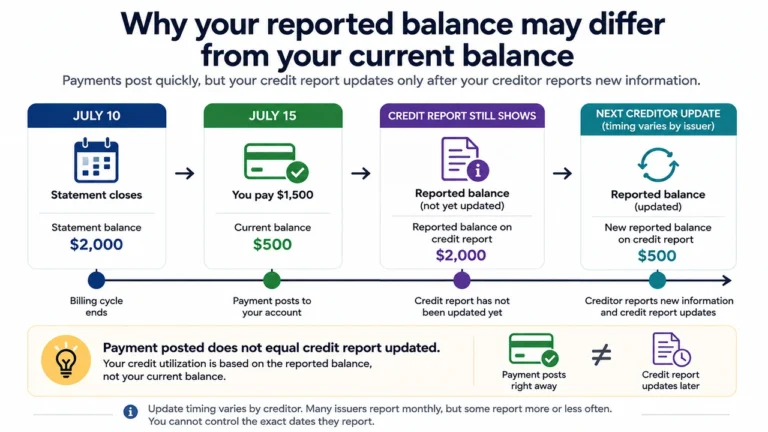
The amount setting matters more than the convenience setting. Before turning on autopay, understand the difference between paying the required minimum and paying the balance shown on your statement. Your current balance may be higher because it can include purchases made after the statement closed.
Paying only the minimum can avoid a late payment when it clears, but it may leave a balance that accrues interest under your card agreement. A fixed amount can work well for debt repayment, provided it always covers at least the required minimum. If it does not, you may still be late.
Full-statement-balance autopay can be convenient when your cash flow reliably supports it and your goal is to pay the billed balance in full. It aligns the payment with the billing cycle rather than the live account balance. Learn why those dates differ in this guide to the credit card statement date versus due date.
The main benefits of credit card autopay
Fewer missed due dates
A scheduled payment reduces the chance that a busy week, travel, or a forgotten reminder causes an avoidable late bill.
A simpler monthly routine
You can reserve statement review for a regular date instead of repeatedly logging in to make a routine payment.
Support for a payoff system
A fixed automatic amount can reinforce a debt payoff plan while you make additional payments whenever your budget allows.
Automation is especially helpful if you manage several accounts. Still, avoid treating it as permission to ignore your cards. A short monthly review can catch unfamiliar charges, annual fees, expiring promotions, credits, and changes to recurring subscriptions. It also gives you a chance to compare spending with your plan before the next statement closes.
Risks to manage before you enroll
A failed payment can still create a problem
Autopay can fail if the linked account is closed, the routing or account number is wrong, the account lacks available funds, or a bank rejects the transfer. An issuer may charge a returned-payment fee where permitted, and your bank could charge an overdraft or nonsufficient-funds fee depending on the account and its settings. A failed payment can also leave the required amount unpaid after the due date.
Do not assume an enrollment confirmation means every future payment will succeed. Review the payment status after each due date, particularly during the first few cycles. If autopay has already gone wrong, read what to do when autopay failed and caused a late payment.
Cash flow can be tighter than your card balance suggests
Full-balance autopay works best when you treat the card like a debit card for budgeting purposes. If you charge groceries throughout the month but spend the cash elsewhere, the automatic withdrawal may arrive before your next deposit. A payment that clears can also leave too little for rent, utilities, or other essential bills.
Keep a cushion in the linked account, or move money into it on a recurring schedule that occurs before the card payment date. If your paydays move, freelance income varies, or your checking account often runs close to zero, manually paying after reviewing cash flow may be the lower-risk choice.
Disputes and unexpected charges still need attention
Before changing a scheduled debit, follow the credit card charge-dispute checklist. Confirm the undisputed amount still due and preserve any written billing-error notice deadline.
Autopay may pay a charge you later question. That does not necessarily prevent you from disputing an error, but it can complicate your cash flow while the issue is reviewed. Read your statement promptly, keep receipts when useful, and follow the issuer’s billing-error instructions rather than simply canceling autopay at the last minute.
How to set up credit card autopay safely
Use your issuer’s official website or app, not a link in an unexpected email or text. You will normally find autopay under payments, account services, or manage account. Have the checking account’s routing and account numbers ready if the bank account is not already connected.
- Review the current statement, due date, minimum payment, and statement balance.
- Choose a checking account with dependable funds and confirm its account details.
- Select the amount rule: full statement balance, minimum due, or a fixed amount that meets your plan.
- Read the scheduled withdrawal date and confirm whether it changes on weekends or holidays.
- Save the confirmation page or email, then add calendar reminders before and after the first payment.
- Check that the payment posted and that your bank account shows the expected withdrawal.
If you enroll close to the due date, do not assume the current bill is covered. Some issuers require enrollment before a cutoff and may begin automatic payments in a later billing cycle. Make the current payment manually if the issuer does not clearly confirm that autopay will handle it.
If the withdrawal date clashes with payday, you may be able to change your credit card payment due date. Confirm when the new schedule starts and check autopay separately so the current bill is still covered.
Build a simple autopay monitoring routine
If two payments go through and leave a credit on your account, follow our credit card overpayment refund guide. Check the status of each payment and confirm the next scheduled withdrawal before changing your autopay settings.
The strongest setup combines automation with alerts. Turn on statement-available, payment-scheduled, payment-posted, and low-bank-balance alerts when available. Alerts are reminders to verify, not proof that everything is correct. Check the issuer account and your bank transaction history after the due date.
A useful monthly routine takes only a few minutes:
- When the statement arrives, review every charge and the required payment.
- Several days before the withdrawal, confirm enough available cash is in the funding account.
- After the due date, verify the payment posted to the card and cleared the bank.
- Update autopay immediately if you replace a checking account, change banks, or close an account.
- Reconsider the payment amount after a job change, large expense, balance transfer, or promotional offer.
If your credit card was lost or stolen, confirm your issuer autopay separately from subscriptions charged to the card. Our guide to replacing a lost credit card and checking saved payments explains what to verify while the new card is on its way.
Keep an eye on the difference between available balance and pending transactions. A checking account can look healthy until automatic drafts, checks, or debit-card purchases settle. Leave room for those transactions instead of funding the card payment down to the last dollar.
When manual payment may be better
Manual payment is not a failure of organization. It can be the smarter option when your income is irregular, you are rebuilding a checking-account cushion, you need to coordinate multiple bills around variable paydays, or you closely manage a short-term payoff plan. The key is replacing autopay with a reliable process: calendar reminders, a written due-date list, and enough lead time to resolve a transfer issue.
You might also prefer manual payments while actively investigating suspicious charges or correcting a billing issue. In that situation, read the statement carefully and contact the issuer promptly. Do not skip an undisputed required payment without understanding the consequences under your account agreement.
Another middle ground is minimum-payment autopay plus manual extra payments. This may provide a backstop against an accidental missed due date while allowing you to decide how much additional cash to send each month. It still requires enough money for the automatic minimum payment.
Set it up, then verify it
A full-statement-balance autopay setting can be a useful default when your cash flow supports it. Review statements and confirm each payment so convenience does not become complacency.
Frequently asked questions
Does autopay pay my current balance?
Usually not if you select the statement-balance option. It typically pays the balance on the statement generated for that billing cycle. New purchases made afterward may appear in your current balance and will generally be part of a later statement.
Can I use autopay and make extra payments?
Yes, but check your issuer’s rules first. An extra payment may change the scheduled automatic payment, or it may not. Review the next scheduled withdrawal before sending money to avoid paying more than intended from your checking account.
Should I turn off autopay after paying off a balance?
Not necessarily. If you plan to keep using the card, full-statement-balance autopay can continue to handle new monthly statements. If you will stop using the card or close the linked bank account, review and update the autopay instructions promptly.
Explore related guides on credit cards and utilization.